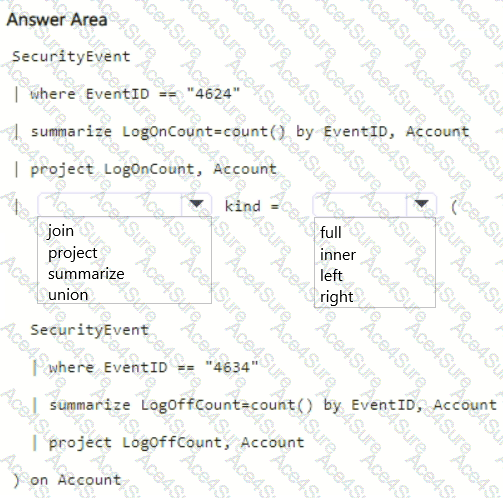
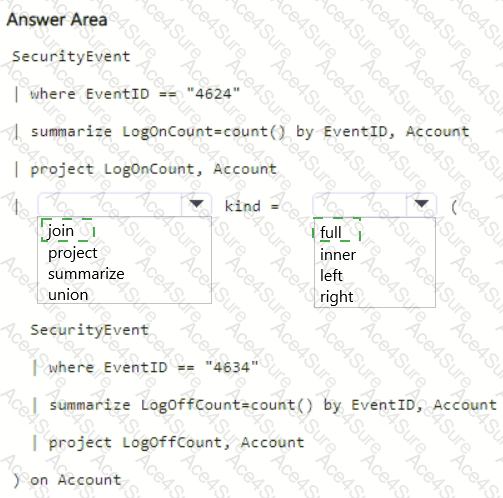
First dropdown: join
Second dropdown: full
In Microsoft Sentinel and Kusto Query Language (KQL), when you need to combine two tables based on a common field , you use the join operator. In this scenario, both queries pull from the same SecurityEvent table but filter on different Event IDs — 4624 for logon and 4634 for logoff events. To correlate or compare the two results by Account , you need to join them.
The first query returns the number of logon events per account ( LogOnCount ), while the second returns the number of logoff events per account ( LogOffCount ). The join key is Account , which exists in both result sets.
To ensure that all accounts — those who may have only logon events or only logoff events — are included in the visualization, you use a full join. A full join combines matching records from both sides and keeps unmatched r ecords from either side, filling missing values with nulls. This ensures that every account with either a logon or a logoff count appears in the results.
Therefore, the correct query completion is:
SecurityEvent
| where EventID == " 4624 "
| summarize LogOnC ount = count() by EventID, Account
| project LogOnCount, Account
| join kind = full (
SecurityEvent
| where EventID == " 4634 "
| summarize LogOffCount = count() by EventID, Account
| project LogOffCount, Account
) on Account
This query gives a complete view of all accounts and their corresponding logon/logoff counts.
✅ Correct selections: