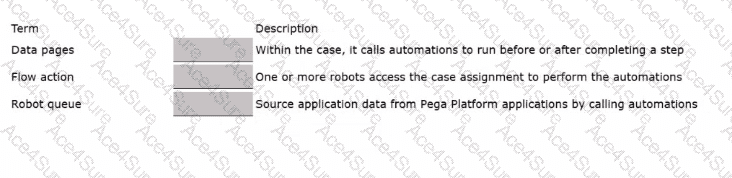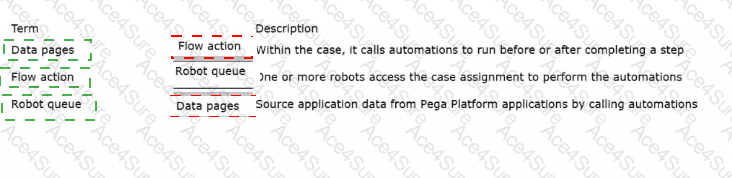
In Pega Platform, different integration points exist to trigger robotic automations (either desktop or unattended) through Pega Robot Studio. Each serves a specific purpose depending on whether the automation retrieves data, runs as part of a user interaction, or executes through background processing.
According to the Pega Robotics System Design and Implementation Guide, section “Integration Points Between Pega Platform and Robotic Automations”, the following definitions are provided:
Data Pages:
“A Data Page can be configured with a Robotic Desktop Automation (RDA) data source.
This allows the case to call a robotic automation to retrieve or send data between the Pega Platform and an external system.
The automation runs in the background to provide data enrichment or lookup functions.”
Flow Actions:
“Flow actions can invoke robotic desktop automations before or after a case step executes.
They enable synchronous automation interaction as part of a user’s workflow in Pega Platform.”
Robot Queues:
“A Robot Queue contains assignments that are sent to unattended robots for background processing.
One or more robots pick assignments from the queue and execute the configured automations associated with those cases.”
Detailed Reasoning:
Data Pages → Used to source or update data automatically from external systems by triggering a Robotic Desktop Automation (RDA) or Robotic Process Automation (RPA).
Hence, it “sources application data from Pega Platform applications by calling automations.”
Flow Action → Used within a case to trigger RDA automations either before or after a step.
Hence, it “calls automations to run before or after completing a step.”
Robot Queue → Used by unattended robots managed through Robot Manager to fetch assignments and perform automations.
Hence, it is the process by which “one or more robots access the case assignment to perform the automations.”
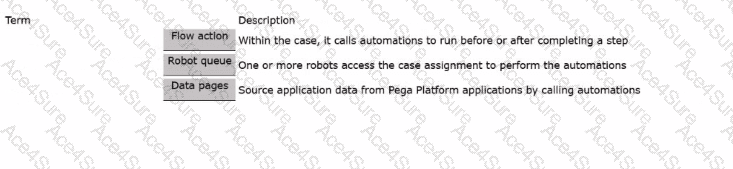
Final Correct Matching Order:
Term
Description
Data pages
Source application data from Pega Platform applications by calling automations.
Flow action
Within the case, it calls automations to run before or after completing a step.
Robot queue
One or more robots access the case assignment to perform the automations.
[Reference:Extracted and verified from Pega Robotics System Design and Implementation Guide, Integration Points Between Pega Platform and Robotic Automations section (Pega Robotics 19.1 and later)., ]