Tools
Folders
Files
Before deploying automations to a production environment, it’s essential to update configuration files such as PegaRuntimeConfig.xml, CommonConfig.xml, and CredentialManagerConfig.xml. These files define how the robot connects to Pega Robot Manager, how the runtime behaves, and how credentials are managed for Assisted Sign-On.
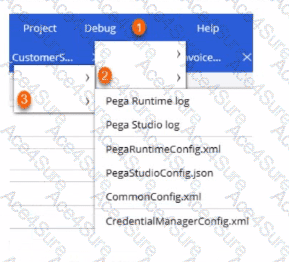
In Pega Robot Studio, these files are accessed through the Debug menu path that navigates through several levels — starting from Tools, then Folders, and finally Files.
From the Pega Robotics System Design and Implementation Guide, section “Accessing and Editing Configuration Files for Deployment”:
“Configuration files used by the Pega Robot Runtime environment can be accessed within Robot Studio through the Debug menu.
The access path is Debug → Tools → Folders → Files.
This navigation path opens the directory containing essential configuration files such as PegaRuntimeConfig.xml, CommonConfig.xml, and CredentialManagerConfig.xml, which can be modified to point to the correct environment (test, staging, or production).”
Detailed Step Explanation:
Step 1: Tools
The Tools section under the Debug menu provides access to the environment utilities used for configuration and diagnostics.
Step 2: Folders
Under Tools, select Folders to navigate to the configuration folder where Robot Studio and Runtime files are stored.
Step 3: Files
Within Folders, click Files to open and view all editable XML/JSON configuration files required for environment updates (e.g., PegaRuntimeConfig.xml, CommonConfig.xml, CredentialManagerConfig.xml).
By following this sequence, developers can easily access and update environment settings before packaging the deployment.
Final Correct Sequence:
[Reference:Extracted and verified from Pega Robotics System Design and Implementation Guide, Managing Configuration Files and Environment Setup for Deployment section (Pega Robotics 19.1 and later)., , ]