Exact Extract — Official Administration Guide
FortiOS 8.0.0 Administration Guide | Antivirus inspected protocols | p. 2407
“The feature set setting (proxy or flow) in the antivirus profile must match the inspection mode setting (proxy or flow) in the associated firewall policy. For example, a flow-based antivirus profile must be used with a flow-based firewall policy.”
Technical Deep Dive
In FortiOS 8.0, the Antivirus scan master switch in an antivirus profile becomes available only after at least one supported protocol is enabled for inspection.
What the exhibit shows
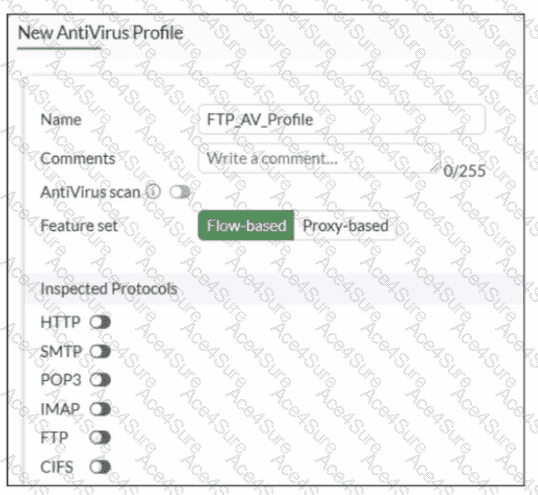
A new antivirus profile named FTP_AV_Profile
Feature set: Flow-based
Antivirus scan switch is grayed out
All Inspected Protocols (HTTP, SMTP, POP3, IMAP, FTP, CIFS) are currently disabled
In FortiOS antivirus profiles:
The Antivirus scan toggle is a dependent control
It cannot be enabled unless at least one inspected protocol is selected
This prevents enabling AV scanning when there is no traffic type to scan
This behavior is documented in the FortiOS 8.0 Antivirus Profile configuration section.
Once you enable a protocol (for example, FTP), the Antivirus scan switch becomes active and configurable.
B. None of the inspected protocols are active in this profile.
All protocol toggles are OFF
Therefore, FortiGate disables (grays out) the Antivirus scan option
This is expected and correct behavior
A. Antivirus scan is disabled under Feature visibilityIncorrect. Feature Visibility controls whether Antivirus appears in the GUI, not whether the scan switch is enabled inside a profile.
C. Feature set must be Proxy-basedIncorrect. Antivirus scanning is supported in both flow-based and proxy-based modes.
D. Less than 2 GB RAM does not support Antivirus scanIncorrect. Memory size affects performance and offloading, not basic AV scan availability.
FortiOS 8.0 verification note: At least one inspected protocol must be enabled before AV scan settings can apply.