Exact Extract — Official Administration Guide
FortiOS 8.0.0 Administration Guide | Oversized file blocking | p. 2252
“A threshold is assigned to identify an oversize file or email. The default is 10 MB. The range varies per model, and the minimum is 1 MB.”
Technical Deep Dive
This option is related to antivirus scanning. The FortiGate has a finite amount of resources to buffer and scan a file. If a large file (such as an ISO image or video file) is downloaded, this could overwhelm or exceed the FortiGate’s memory, especially if other large files are being downloaded at the same time.
A threshold is assigned to identify an oversize file or email. The default is 10 MB. The range varies per model, and the minimum is 1 MB. Any file or email over this threshold will not be processed by policies applying the antivirus security profile.
FortiGate antivirus inspection uses configurable file-size thresholds to prevent excessively large files from exhausting firewall memory and processing resources. When a file exceeds the configured inspection threshold, it cannot undergo normal antivirus scanning.
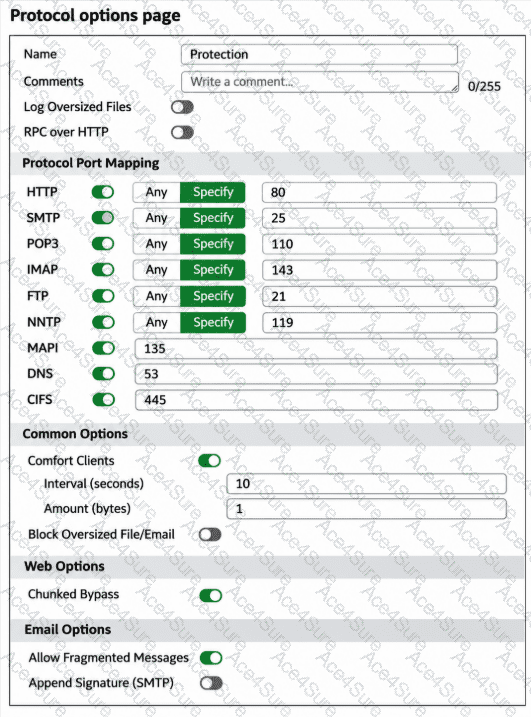
In the exhibit, Block Oversized File/Email is disabled. Consequently, oversized downloads may bypass antivirus scanning and reach users without malware inspection, creating the security exposure described in the scenario.
For effective protection, administrators should enable oversized-file blocking, configure an appropriate inspection threshold, and ensure antivirus inspection is applied to the relevant firewall policies. HTTPS downloads also require appropriate SSL inspection to expose encrypted content for malware scanning.
Therefore, option A is correct: Set Block Oversized File/Email to enable.
FortiOS 8.0 verification note: Blocking oversized transfers prevents unscanned files that exceed the configured threshold.