Exact Extract — Official Administration Guide
FortiOS 8.0.0 Administration Guide | Application override priority | p. 2609
“When creating an application sensor, you can define the applications that you want to control. You can add applications and filters using categories, application overrides, and/or filter overrides with designated actions (monitor, allow, block, or quarantine).”
Technical Deep Dive
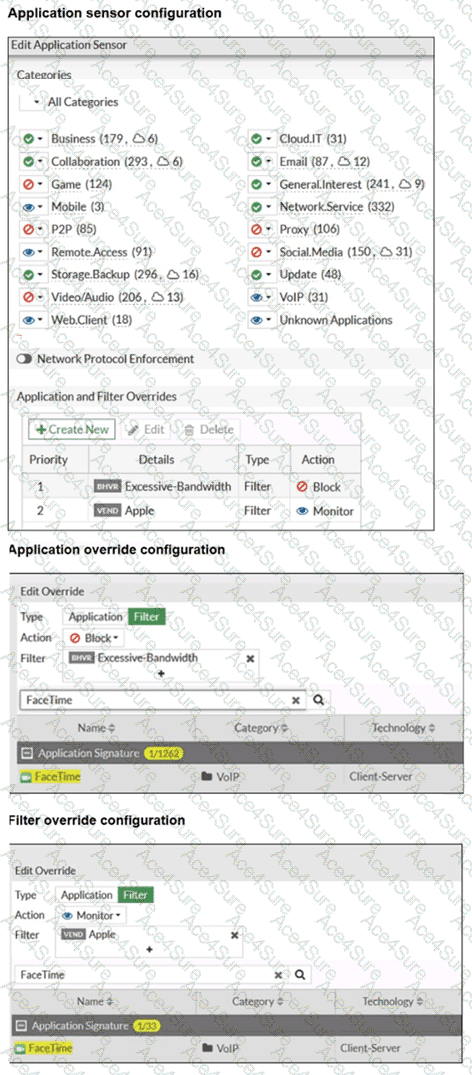
the Application Control engine processes traffic by evaluating the Application and Filter Overrides section first, using a top-down matching logic similar to firewall policies. In the provided exhibit, there are two override entries:
Priority 1: A behavior-based filter for Excessive-Bandwidth with the action set to Block.
Priority 2: A vendor-based filter for Apple with the action set to Monitor.
The exhibit titled " Application override configuration " explicitly shows that Apple FaceTime is one of the signatures included within the Excessive-Bandwidth behavior filter. When the FortiGate inspects FaceTime traffic, it matches the first entry (Priority 1) because the signature belongs to the " Excessive-Bandwidth " group. Since the action for this priority is Block, the traffic is dropped immediately.
The phrase " only a few calls " is a common exam distractor; in this context, the " Excessive-Bandwidth " filter refers to the classification of the application (as one that typically consumes high bandwidth) rather than a real-time measurement of the specific session ' s throughput. Because the engine stops searching once a match is found in the overrides, it never reaches the Priority 2 " Monitor " rule or the general Category settings.
FortiOS 8.0 verification note: Application override priority determines whether Apple FaceTime matches a blocking behavior filter.