Exact Extract — Official Administration Guide
FortiOS 8.0.0 Administration Guide | SD-WAN zones and members | p. 1111
“SD-WAN zones and members can be used in IPv4 and IPv6 static routes to make route configurations more flexible. SD-WAN zones and members can be used in SD-WAN rules to simplify the rule configuration. See Specify an SD-WAN zone in static routes and SD-WAN rules on page 1117 for more information.”
Technical Deep Dive
According to the FortiOS and the specific behavior of the SD-WAN GUI, here is the technical breakdown:
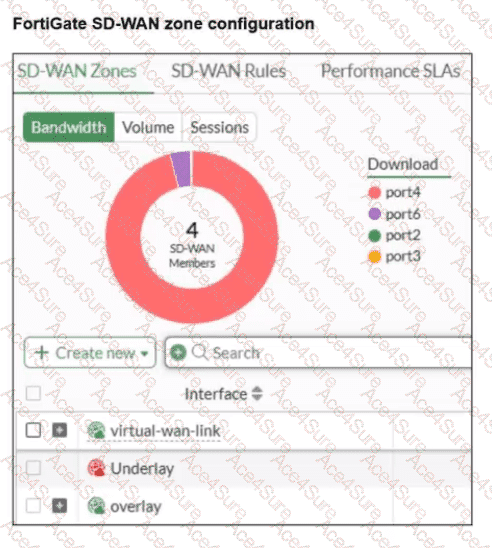
SD-WAN Zone Hierarchy and UI Elements: In the FortiGate GUI, SD-WAN zones that contain member interfaces are displayed with a plus (+) icon next to the checkbox. This icon allows administrators to expand the zone and view the specific physical or logical interfaces assigned to it.
Analysis of the " Underlay " Zone: In the provided exhibit, the virtual-wan-link and overlay zones both feature the plus (+) expansion icon, indicating they have active members. The Underlay zone, however, lacks this icon and displays a red status icon. This is the visual indicator in FortiOS that the zone is currently empty and contains no member interfaces.
Mandatory Zone Membership: In FortiOS 7.x, every SD-WAN member interface must be assigned to a zone. It is not possible for an interface to be an " SD-WAN member " (as shown in the legend with port2 and port3) without being assigned to a zone. Since port2 and port3 are listed in the legend, they are indeed assigned to one of the other expanded zones (likely virtual-wan-link or overlay), making Option D incorrect.
Default Zone Behavior: While FortiOS 8.0 often creates default zones like virtual-wan-link, underlay, and overlay during certain configuration wizards or by default in newer versions, they are distinct entities. There is no single " default " zone that acts as a global catch-all in the way Option C suggests.
FortiOS 8.0 verification note: An empty Underlay group does not mean SD-WAN member interfaces lack zones.