“With these multiple filters, which one has the priority? After the IPS engine examines the traffic stream for a signature match, FortiGate scans packets for matches, in this order, for the application control profile:
1. Application and filter overrides ...”
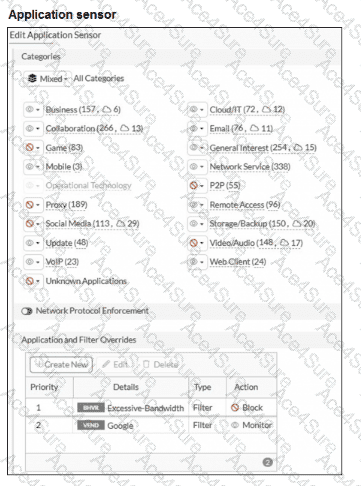
“Next, the scan checks for application and filter overrides. Because a filter override is configured to block applications that use excessive bandwidth, it blocks all applications using excessive bandwidth , regardless of other categories that allow these applications.”
“In this scenario, the filter override (Excessive-Bandwidth) is blocked and, since Dailymotion falls under the excessive bandwidth category, Dailymotion is blocked even though it is set to Monitor in the Application and Filter Overrides section. The priority in which application and filter overrides are placed takes precedence. ”
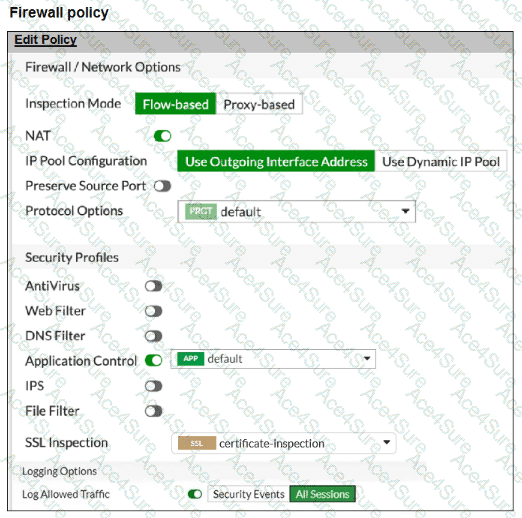
“To allow web filtering, DNS filtering, or application control for HTTPS traffic , you must select an SSL inspection profile with certificate inspection or a deep inspection enabled.”
Technical Deep Dive:
The problem is not flow-based mode and not the SSL profile. Your firewall policy already has certificate-inspection , and the study guide explicitly says that application control for HTTPS traffic works with certificate inspection or deep inspection . So option B is unnecessary, and option A is unrelated.
The real issue is the override order inside the application sensor:
Priority 1: Filter = Excessive-Bandwidth , Action = Block
Priority 2: Vendor = Google , Action = Monitor
FortiGate evaluates overrides from top to bottom and applies the first match . Many Google applications match the Excessive-Bandwidth filter, so they are blocked before the later Google/Monitor override is ever reached. That is why Google apps fail while www.fortinet.com still works.
So the correct fix is to move the Google override above the Excessive-Bandwidth filter , making Google the first match.
A representative CLI-style logic would be:
config application list
edit " default "
config entries
edit 1
set vendor " Google "
set action monitor
next
edit 2
set filter " Excessive-Bandwidth "
set action block
next
end
next
end
That preserves the bandwidth block for other apps while allowing Google applications to match the higher-priority override first.