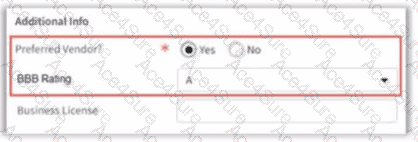
Implementing dynamic UI behavior where one field appears or disappears based on the value of another is a common task in GuidewirePage Configuration Framework (PCF). To achieve this "conditional visibility," two distinct configuration steps are required to ensure the user interface remains responsive and accurate.
1. Triggering the UI Refresh (Option B)
By default, the Guidewire web client does not send data to the server until a major action (like clicking "Update" or "Next") occurs. However, when one field's state depends on another, we need an immediate update. EnablingpostOnChangeon the "triggering" field—in this case, Preferred Vendor?—tells the application to perform an asynchronous (AJAX) request as soon as the user modifies that field. This refresh allows the PCF logic to re-evaluate properties for all other widgets on the screen.
2. Defining the Visibility Logic (Option C)
Once the page is set to refresh, the "target" field—the BBB Rating—must know when it is allowed to be seen. This is handled by thevisibleproperty. In Guidewire Studio, the developer enters a Gosu expression in the visible property of the BBB Rating widget, such as: contact.PreferredVendor == true (or the equivalent boolean/typekey check).
Why other options are incorrect:
Option A:The onChange property is for executing logic (like setting a default value), not for controlling visibility. Setting a value won't make the field appear.
Option D:Enabling postOnChange on the BBB Rating field itself is useless here, as it is the fieldbeing shown, not the fieldcausingthe change.
Option E:Setting the editable property only controls whether a field can be typed in; it does not hide the field from view, which is what the business analyst requested.
By combining postOnChange on the source and a visible expression on the target, the developer creates a modern, reactive user experience that adheres toGuidewire UI best practices.