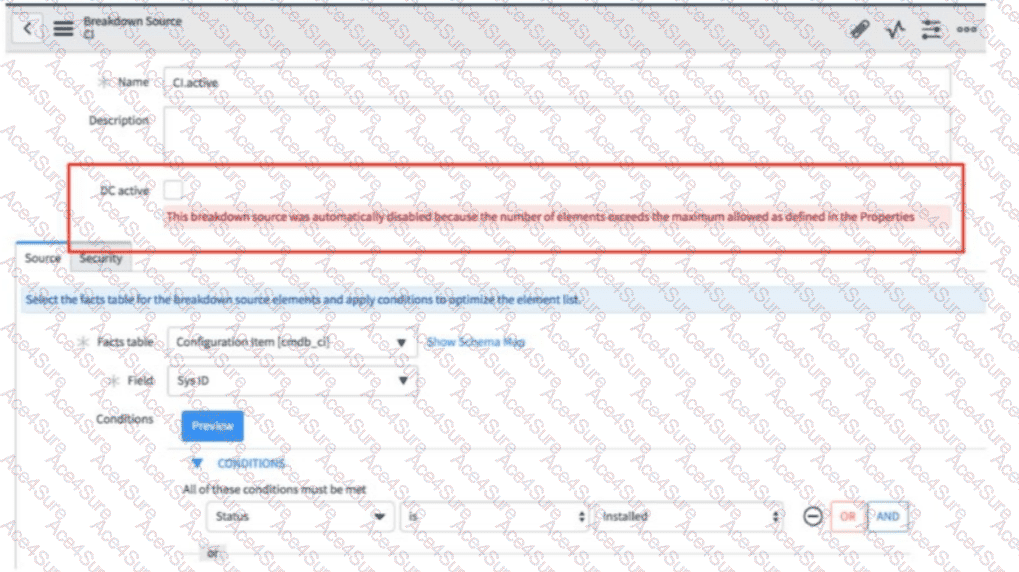
In ServiceNow Platform Analytics, aBreakdown Sourceis automatically disabled when the number of generated breakdown elements exceeds themaximum element limitdefined in system properties (for example, properties controlling the maximum allowed breakdown elements during data collection). This safeguard exists to protect system performance and prevent excessive storage and processing during data collection jobs.
When this error occurs, therecommended and documented resolutionisnotto increase the system property arbitrarily. Increasing the global limit can negatively impact performance across all analytics workloads and is discouraged unless there is a strong architectural justification.
Instead, ServiceNow best practice is torefine the Breakdown Source conditions—for example, by adding filters, narrowing scope, or excluding unnecessary records—so that the number of returned elements fallsbelow the configured system threshold. Once the conditions are optimized, you can safely re-enableDC active, and the breakdown will participate in data collection successfully.
Simply re-enabling DC active without reducing elements will cause the breakdown to be disabled again, and deleting/recreating the source does not address the root cause. Therefore,option Dis the correct and fully supported resolution according to ServiceNow Platform Analytics documentation and best practices.