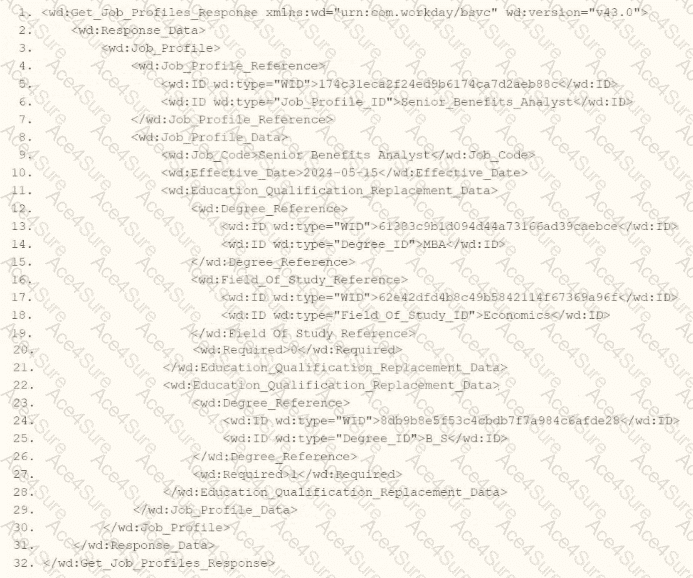
As an integration developer working with Workday, you are tasked with transforming the output of an Enterprise Interface Builder (EIB) that calls the Get_Job_Profiles web service operation. The provided XML shows the response from this operation, and you need to write XSLT to select the value of the < wd:Job_Code > element. The root template of your XSLT matches on < wd:Get_Job_Profiles_Response > and applies a template to < wd:Job_Profile > . Within this template, you use the < xsl:value-of > element to extract the < wd:Job_Code > value. Let’s analyze the XML structure, the requirement, and each option to determine the correct XPath syntax.
Understanding the XML and Requirement
The XML snippet provided is a SOAP response from the Get_Job_Profiles web service operation in Workday, using the namespace xmlns:wd= " urn:com.workday/bsvc " and version wd:version= " v43.0 " . Key elements relevant to the question include:
It contains < wd:Response_Data > , which includes < wd:Job_Profile > elements.
Within < wd:Job_Profile > , there are:
< wd:Job_Profile_Reference > , which contains < wd:ID > elements (e.g., a Job_Profile_ID).
The task is to select the value of < wd:Job_Code > (e.g., " Senior_Benefits_Analyst " ) using XPath within an XSLT template that matches < wd:Job_Profile > . The < xsl:value-of > element outputs the value of the selected node, so you need the correct XPath path from the < wd:Job_Profile > context to < wd:Job_Code > .
Analysis of Options
Let’s evaluate each option based on the XML structure and XPath syntax rules:
Option A: wd:Job_Profile/wd:Job_Profile_Data/wd:Job_Code
This XPath starts from wd:Job_Profile and navigates to wd:Job_Profile_Data/wd:Job_Code. However, in the XML, < wd:Job_Profile > is the parent element, and < wd:Job_Profile_Data > is a direct child containing < wd:Job_Code > . The path wd:Job_Profile/wd:Job_Profile_Data/wd:Job_Code is technically correct in terms of structure, as it follows the hierarchy:
However, since the template matches < wd:Job_Profile > , the context node is already < wd:Job_Profile > . You don’t need to include wd:Job_Profile/ at the beginning of the XPath unless navigating from a higher level. Starting directly with wd:Job_Profile_Data/wd:Job_Code (Option C) is more concise and appropriate for the context. This option is technically valid but redundant and less efficient, making it less preferred compared to Option C.
Option B: wd:Job_Profile_Data[@wd:Job_Code]
This XPath uses an attribute selector ([@wd:Job_Code]) to filter < wd:Job_Profile_Data > based on an attribute named wd:Job_Code. However, examining the XML, < wd:Job_Profile_Data > does not have a wd:Job_Code attribute—it has a child element < wd:Job_Code > with the value " Senior_Benefits_Analyst. " The [@attribute] syntax is used for attributes, not child elements, so this XPath is incorrect. It would not select the < wd:Job_Code > value and would likely return no results or an error. This option is invalid.
Option C: wd:Job_Profile_Data/wd:Job_Code
This XPath starts from wd:Job_Profile_Data (a direct child of < wd:Job_Profile > ) and navigates to wd:Job_Code. Since the template matches < wd:Job_Profile > , the context node is < wd:Job_Profile > , and wd:Job_Profile_Data/wd:Job_Code correctly points to the < wd:Job_Code > element within < wd:Job_Profile_Data > . This path is:
Option D: wd:Job_Profile_Reference/wd:ID[@wd:type= ' Job_Profile_ID ' ]
This XPath navigates to < wd:Job_Profile_Reference > (a child of < wd:Job_Profile > ) and then to < wd:ID > with an attribute wd:type= " Job_Profile_ID " . In the XML, < wd:Job_Profile_Reference > contains:
The XPath wd:Job_Profile_Reference/wd:ID[@wd:type= ' Job_Profile_ID ' ] selects the < wd:ID > element with wd:type= " Job_Profile_ID " , which has the value " Senior_Benefits_Analyst. " However, this is not the < wd:Job_Code > value—the < wd:Job_Code > is a separate element under < wd:Job_Profile_Data > , not < wd:Job_Profile_Reference > . The question specifically asks for the < wd:Job_Code > value, so this option is incorrect, as it selects a different piece of data (the job profile ID, not the job code).
Why Option C is Correct
Option C, wd:Job_Profile_Data/wd:Job_Code, is the correct XPath syntax because:
It starts from the context node < wd:Job_Profile > (as the template matches this element) and navigates to < wd:Job_Profile_Data/wd:Job_Code > , which directly selects the < wd:Job_Code > element’s value ( " Senior_Benefits_Analyst " ).
It is concise and aligns with standard XPath navigation in XSLT, avoiding unnecessary redundancy (unlike Option A) or incorrect attribute selectors (unlike Option B).
It matches the XML structure, where < wd:Job_Profile_Data > is a child of < wd:Job_Profile > and contains < wd:Job_Code > as a child.
When used with < xsl:value-of select= " wd:Job_Profile_Data/wd:Job_Code " / > in the template, it outputs the job code value, fulfilling the requirement.
Practical Example in XSLT
Here’s how this might look in your XSLT:
xml
WrapCopy
< xsl:template match= " wd:Job_Profile " >
< xsl:value-of select= " wd:Job_Profile_Data/wd:Job_Code " / >
< /xsl:template >
This would output " Senior_Benefits_Analyst " for the < wd:Job_Code > element in the XML.
Verification with Workday Documentation
The Workday Pro Integrations Study Guide and SOAP API Reference (available via Workday Community) detail the structure of the Get_Job_Profiles response and how to use XPath in XSLT for transformations. The XML structure shows < wd:Job_Profile_Data > as the container for job profile details, including < wd:Job_Code > . The guide emphasizes using relative XPath paths within templates to navigate from the matched element (e.g., < wd:Job_Profile > ) to child elements like < wd:Job_Profile_Data/wd:Job_Code > .
Workday Pro Integrations Study Guide References
Section: XSLT Transformations in EIBs – Describes using XSLT to transform web service responses, including selecting elements with XPath.
Section: Workday Web Services – Details the Get_Job_Profiles operation and its XML output structure, including < wd:Job_Profile_Data > and < wd:Job_Code > .
Section: XPath Syntax – Explains how to navigate XML hierarchies in Workday XSLT, using relative paths like wd:Job_Profile_Data/wd:Job_Code from a < wd:Job_Profile > context.
Workday Community SOAP API Reference – Provides examples of XPath navigation for Workday web service responses.
Option C is the verified answer, as it correctly selects the < wd:Job_Code > value using the appropriate XPath syntax within the < wd:Job_Profile > template context.