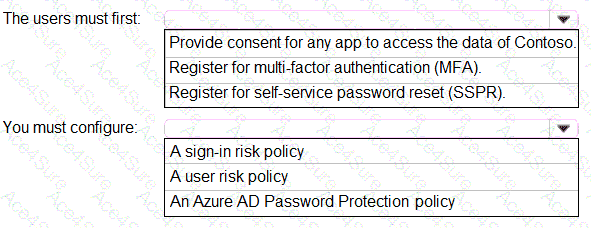
According to the Microsoft Identity and Access Administrator (SC-300) official study guide and Microsoft Learn module “Implement and manage user risk policies”, the scenario where “users must be forced to change their password if there is a probability that their identity was compromised” directly maps to the Azure AD Identity Protection “User risk policy.”
In Azure AD Identity Protection, user risk represents the likelihood that an account’s credentials have been compromised. When Azure AD detects a high user risk (for example, leaked credentials, atypical sign-in behavior, or sign-ins from unfamiliar locations), the User Risk Policy can be configured to automatically block access or require the user to reset their password upon the next sign-in.
Before a user can reset their password or complete remediation, they must have a registered authentication method (for password reset and MFA). Therefore, users must first register for multi-factor authentication (MFA) — this registration enables the authentication methods (like phone number or authenticator app) that are also used during password reset verification.
The SC-300 documentation specifically highlights:
“To enforce a password change when a user’s identity risk is high, the user must be registered for MFA, and a user risk policy must be configured to require password change.”
Thus, the correct configuration is:
Users must first register for MFA — to ensure they have verified methods available.
Configure a user risk policy — to automatically trigger password reset upon detection of compromised credentials.
Correct Answers:
Users must first: Register for multi-factor authentication (MFA).
You must configure: A user risk policy.