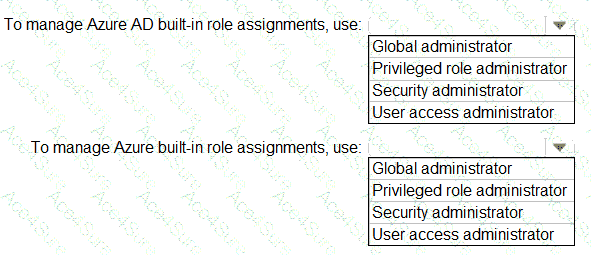
According to the Microsoft SC-300: Identity and Access Administrator Study Guide and Microsoft Learn modules “Implement and manage Azure AD roles” and “Implement Privileged Identity Management (PIM)”, there is a clear distinction between Azure AD built-in roles and Azure (resource-based) built-in roles.
Azure AD built-in roles govern directory-level access — such as managing users, groups, enterprise apps, or security settings in Azure Active Directory (Entra ID).The Privileged Role Administrator role allows the user to manage role assignments for directory roles in Azure AD, including activating roles through PIM.The Global Administrator also has this capability, but the Privileged Role Administrator is the least privilege role that meets the delegation requirement — aligning with the principle of least privilege stated in the scenario.As the documentation notes:
“Privileged Role Administrator manages role assignments in Azure AD, including the ability to activate and assign roles through Azure AD Privileged Identity Management.”
Azure built-in roles, on the other hand, are used to control access at the Azure resource level — for subscriptions, resource groups, and individual resources.The role responsible for managing these assignments is the User Access Administrator.This role can grant or revoke access to Azure resources by managing role assignments within Azure RBAC (Role-Based Access Control).The Microsoft documentation states:
“User Access Administrator allows management of user access to Azure resources. It can assign roles in Azure RBAC for resources, subscriptions, and management groups.”
Therefore:
✅ To manage Azure AD built-in role assignments → Privileged role administrator
✅ To manage Azure built-in role assignments → User access administrator
This approach satisfies the delegation requirement mentioned in the scenario by assigning the least-privileged roles necessary for each type of role management task.