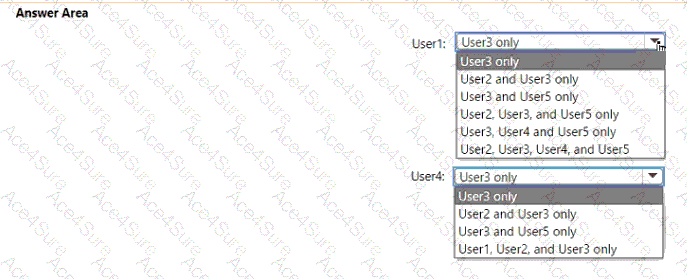
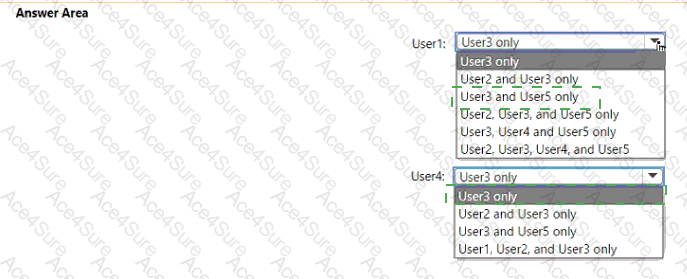
User
Can Reset Passwords For
User1
User3 and User5 only
User4
User3 only
According to the Microsoft SC-300: Microsoft Identity and Access Administrator Study Guide and official Microsoft Learn documentation on role-based access control (RBAC) and administrative units (AUs) , the scope of administrative privileges determines which users an administrator can manage.
Role Review:
Password Administrator (Organization scope): Can reset passwords for non-administrators and users with lesser privileges across the entire organization. They cannot reset passwords for Global Administrators or users with equal/higher roles.
Global Reader (Organization scope): Read-only access—cannot perform administrative actions (including password resets).
Password Administrator (Scoped to AU1): Can reset passwords for users within AU1 who are non-administrators and whose roles are less privileged than their own.
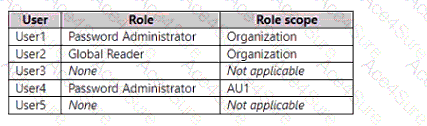
User
Role
Scope
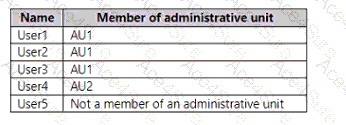
Members in Administrative Unit
User1
Password Administrator
Organization
AU1
User2
Global Reader
Organization
AU1
User3
None
N/A
AU1
User4
Password Administrator
AU1
AU2
User5
None
N/A
None
Step 1 – For User1 (Org-scoped Password Administrator): User1’s permissions apply organization-wide, allowing resets for:
Users without admin roles, including those in or outside any AU.
Cannot reset passwords for users with equal or higher roles (e.g., Global Reader, Password Administrator).
✅ Therefore, User1 can reset passwords for:
Final for User1 → User3 and User5 only
Step 2 – For User4 (AU1-scoped Password Administrator): User4’s permissions apply only within AU1 and to users with lesser privileges.
Within AU1:
User1 (Org Password Admin) – ❌ higher privilege
User2 (Global Reader) – ❌ higher privilege
User3 (no role) – ✅ can reset
Final for User4 → User3 only