In Pega Robot Studio, a Robot Activity serves as the link between a robotic automation (built in Pega Robot Studio) and the Pega Platform. This link allows a Pega case or data page to invoke robotic automations through the Robotic Desktop Automation (RDA) integration.
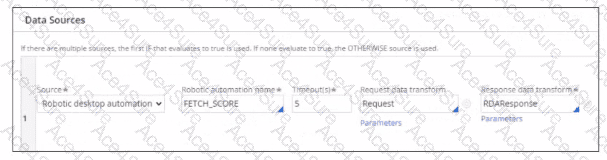
The Data Sources configuration in Pega Platform, as shown in the screenshot, defines the connection between a data page and a robotic automation. The field labeled “Robotic automation name” directly corresponds to the ActivityName property in the Robot Studio’s activity definition.
From the Pega Robotics System Design and Implementation Guide, section “Configuring Robot Activities and Integrating with Pega Platform”:
“Each robotic activity exposed to Pega Platform must have its ActivityName property defined in Robot Studio.
The ActivityName identifies the automation when it is invoked from Pega Platform through Robotic Desktop Automation (RDA) or Robotic Process Automation (RPA).
The name entered in the Pega Platform’s data page configuration (for example, FETCH_SCORE) must match exactly the ActivityName defined in the Robot Studio activity.”
Detailed Reasoning:
The screenshot shows a Data Page Source configuration where:
Source = Robotic desktop automation
Robotic automation name = FETCH_SCORE
Timeout = 5 seconds
Request Data Transform = Request
Response Data Transform = RDAResponse
The Robotic automation name (FETCH_SCORE) identifies which Robot Studio activity should execute when the Pega Platform requests the data.
In Robot Studio, this is mapped to the ActivityName property of the automation’s activity component, ensuring a direct call mapping between Pega and Robot Studio.
Option Analysis:
A. ActivityName: Correct — this is the property used to link the automation in Pega Platform to the robotic activity in Robot Studio.
B. FullName: Incorrect — FullName refers to the namespace or project structure reference, not the callable identifier.
C. (Name): Incorrect — This refers to the internal object label, not the platform reference name.
D. UniqueID: Incorrect — This is an internal system identifier used by Robot Studio for distinguishing components, not for integration with Pega Platform.
Therefore, the correct answer is A. ActivityName.
[Reference:Extracted and verified from Pega Robotics System Design and Implementation Guide, Robot Activity Configuration and Pega Platform Integration (RDA/RPA) section (Pega Robotics 19.1 and later)., ]