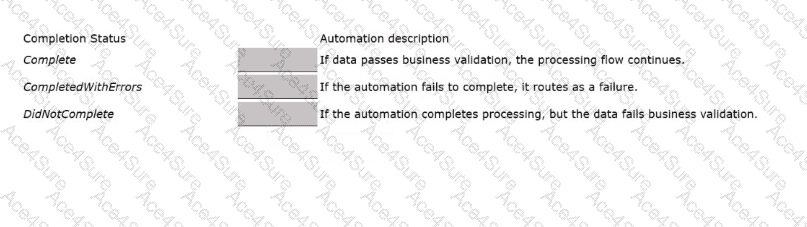
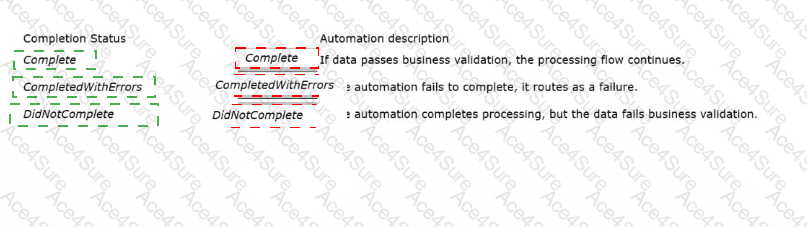
In Pega Robot Studio, when an automation (especially one invoked as a robot activity by Pega Platform) finishes execution, it must return a Completion Status. This status helps the Pega Platform determine the outcome of the automation and decide whether to continue the workflow, retry, or handle an exception.
According to the Pega Robotics System Design and Implementation Guide, section “Robot Activity Completion Status and Workflow Integration”:
“Each robotic activity returns a Completion Status to the Pega Platform after execution.
The completion status communicates the final outcome of the automation’s operation, indicating whether it successfully completed, encountered errors, or produced invalid data.
The most common statuses used are:
Complete: The automation ran successfully, and data passed all validation checks.
DidNotComplete: The automation ran to completion, but business validation failed or data was deemed invalid.
CompletedWithErrors: The automation could not complete execution due to a system or process error.”
Detailed Reasoning:
Complete
Indicates that the robotic automation successfully executed and the resulting data passed all validation checks within Pega.
This allows the Pega case flow to continue normally.
Correct Match: “If data passes business validation, the processing flow continues.”
CompletedWithErrors
Used when the automation fails to complete due to a technical issue or system error (for example, an application did not load or a connector failed).
This causes the flow to route as a failure in Pega.
Correct Match: “If the automation fails to complete, it routes as a failure.”
DidNotComplete
Indicates that the automation successfully executed technically but failed business validation, such as incorrect data, missing inputs, or business rule mismatches.
Correct Match: “If the automation completes processing, but the data fails business validation.”
Final Correct Matching Order:
Completion Status
Automation Description
Complete
If data passes business validation, the processing flow continues.
CompletedWithErrors
If the automation fails to complete, it routes as a failure.
DidNotComplete
If the automation completes processing, but the data fails business validation.
[Reference:Extracted and verified from Pega Robotics System Design and Implementation Guide, Robot Activity Completion Status – RPA and RDA Integration Behavior section (Pega Robotics 19.1 and later)., , ]