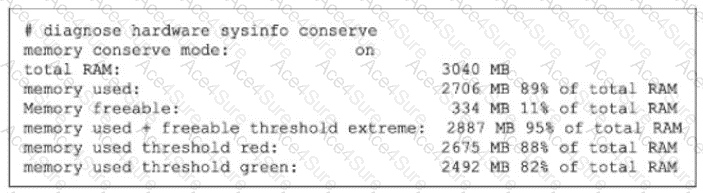
The exhibit shows:
memory conserve mode: on
memory used: 2706 MB 89% of total RAM
memory used threshold red: 2675 MB 88% of total RAM
memory used + freeable threshold extreme: 2887 MB 95% of total RAM
The study guide states that the default thresholds are:
Extreme = 95%
Red = 88%
Green = 82%
So this FortiGate is in conserve mode because memory usage is 89%, which is above the red threshold (88%), but it has not yet reached the extreme threshold (95%).
The study guide then explains exactly what happens during conserve mode:
“For traffic that requires proxy-based inspection (and if memory usage has not exceeded the extreme threshold):
config system global
set av-failopen [off | pass | one-shot]
pass (default): All new sessions pass without inspection”
It also says:
“The av-failopen setting also applies to flow-based antivirus inspection.”
And the same page adds:
“If memory usage exceeds the extreme threshold, all new sessions that require inspection (flow-based or proxy-based) are blocked.”
Therefore, with default settings and with memory usage below the extreme threshold, FortiGate is allowing new sessions that require inspection, but bypassing inspection. That matches C.
Why the other options are wrong:
A is wrong because the default behavior is not to block proxy-based inspected sessions; the default is pass, meaning they pass without inspection
B is wrong because if memory rises another 6%, it reaches 95%, which is the extreme threshold. At that point, the study guide says all new sessions that require inspection are blocked
D is wrong because FortiGate blocks all new inspected sessions only when memory usage exceeds the extreme threshold, and the exhibit shows it is currently at 89%, not 95%