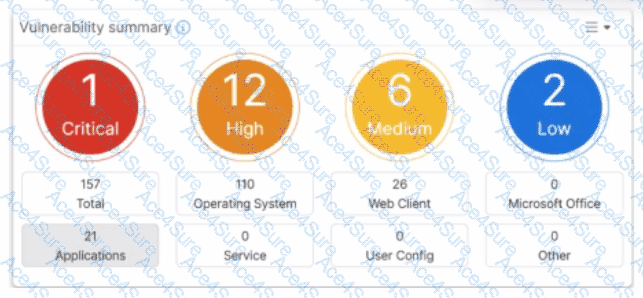
Based on the FortiSASE 7.6 (and later 2025 versions) curriculum and administration guides, the Vulnerability summary dashboard is a key component of the endpoint security posture management.
Drill Down Capability (Option C): According to the FortiSASE Administration Guide, the Vulnerability summary widget on the Security dashboard is interactive. An administrator can click on specific risk categories (e.g., Critical, High) or application types (e.g., Operating System, Web Client) to drill down. This action opens a detailed pane showing the specific affected endpoints, associated CVE identifiers, and severity classifications based on the CVSS standard.
Automatic Vulnerability Patching (Option D): In the FortiSASE 7.6/2025 feature sets, the endpoint profile configuration (under Endpoint > Configuration > Profiles) includes an " Automatic Patching " section. This feature allows the system to automatically install security updates for supported third-party applications and the underlying operating system (Windows/macOS) when vulnerabilities are detected. Furthermore, administrators can schedule these patches directly from the Vulnerability Summary widget by selecting specific vulnerabilities.
Why other options are incorrect:
Option A: The dashboard categories (Operating System, Web Client, Microsoft Office, etc.) are based on known software signatures. While there is an " Other " category, the dashboard primarily provides scores for recognized applications where CVE data is available.
Option B: The exhibit shows active data (157 total vulnerabilities), which indicates that the vulnerability scan is enabled and currently reporting data from the endpoints. If it were disabled, the widget would be empty or show zeros.