Exact Extract — Official Administration Guide
FortiOS 8.0.0 Administration Guide | Static route selection | p. 615
“Advanced Options Optionally, expand Advanced Options and enter a Priority. When two routes have an equal distance, the route with a lower priority number will take precedence. The default is 1.”
Technical Deep Dive
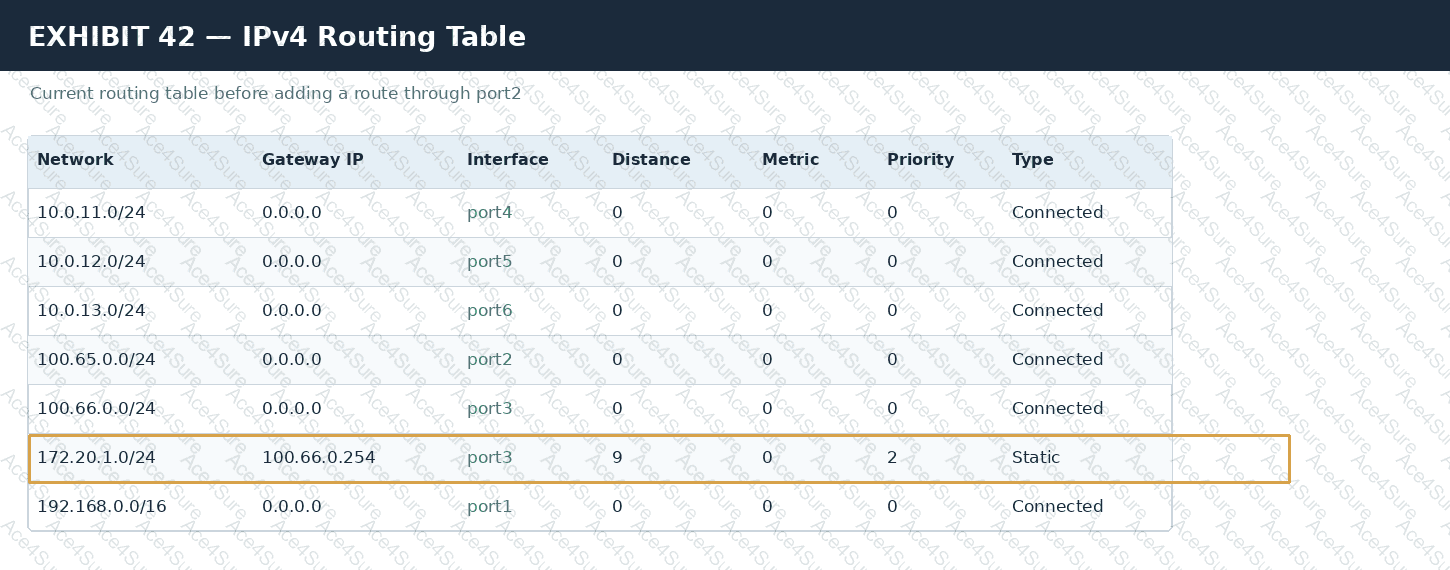
From the routing table in the exhibit, there is already a static route for 172.20.1.0/24 pointing out port3 with:
Distance = 9
Priority = 2
Type = Static
In FortiOS, route selection prefers (in order) the route with the lowest administrative distance to a destination. Therefore, to make traffic to 172.20.1.0/24 go through port2 only, the administrator must ensure the port2 static route is more preferred than the existing port3 route.
C. The existing static route through port3 must have the distance set to 11.
If the existing port3 route distance is increased to 11, then a new port2 route with distance 9 will be preferred (9 < 11). This makes the port3 route a backup route instead of the active one.
D. The new static route must have the distance set to 9
Setting the new port2 route distance to 9 (and increasing the port3 route to 11 as in option C) ensures FortiGate selects the port2 route as the best route for 172.20.1.0/24.
A (priority 3): By itself it does not guarantee selection over the existing route, and FortiOS route choice is driven primarily by distance.
B (metric 1): Metric is not the primary selector for static route preference compared to administrative distance in this scenario.
So the two criteria that achieve the objective are:
Make the existing port3 route less preferred by increasing its distance (C)
Ensure the new port2 route uses the preferred distance (D)
FortiOS 8.0 verification note: Routes with equal prefix prefer lower distance; lower priority wins if distance ties.