Exact Extract — FortiOS 8.0.0 Administration Guide
Section: Performing a Sniffer Trace or Packet Capture, page 5316
The guide defines sniffer verbosity levels as follows:
2 - print header and data from IP of packets
4 - print header of packets with interface name
5 - print header and data from IP of packets with interface name
6 - print header and data from Ethernet of packets with interface name
Technical Deep Dive
The FortiGate packet sniffer supports different verbosity levels to control the amount of packet information displayed.
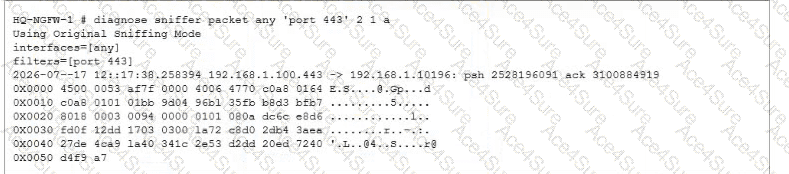
The original command in the exhibit is:
diagnose sniffer packet any ' port 443 ' 2 1 a
Verbosity level 2 displays packet headers and packet data beginning at the IP layer. However, it does not include the interface name in each packet record.
Option C is correct because verbosity level 5 includes the interface name while preserving IP-level header and payload information.
The revised command is:
diagnose sniffer packet any ' port 443 ' 5 1 a
Option A would provide interface information but not the same payload detail.
Option B includes interface information and additional Ethernet-layer data. Although it provides more detail, it does not preserve the same level of packet-content representation requested in the question.
Option D prints Ethernet-layer header and data without the required interface-name output.
The distinction between levels 2, 4, 5, and 6 is particularly useful when troubleshooting traffic entering or leaving specific FortiGate interfaces.