Exact Extract — Official Administration Guide
FortiOS 8.0.0 Administration Guide | Implicit deny | p. 1980
“Traffic parameters are checked against the configured policies for a match. If the parameters do not match any configured policies, the traffic is denied.”
Technical Deep Dive
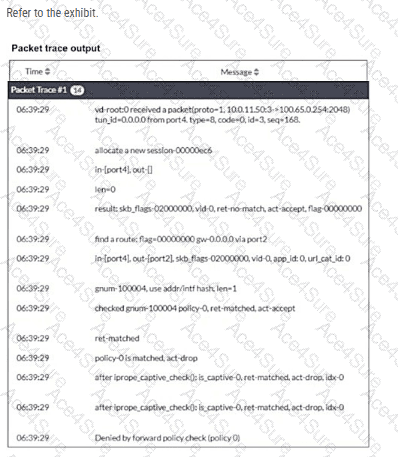
The debug flow output clearly points to the implicit deny:
policy-0 is matched, act-drop
Denied by forward policy check (policy 0)
On FortiGate, policy 0 is the internal representation of the default implicit deny firewall policy. That means the packet did not match any user-defined forward firewall policy, so FortiGate dropped it automatically.
Why the other options are wrong:
B is wrong because an RPF failure would show a reverse-path-related drop reason, not Denied by forward policy check (policy 0).
C is wrong because the trace does not show a matched explicit policy ID with deny action; it shows policy 0, which is the implicit rule.
D is wrong because the trace actually shows a route lookup result: find a route: ... gw-0.0.0.0 via port2. So this is not a next-hop reachability failure.
In packet-flow troubleshooting, this pattern is one of the most important to recognize. If you see policy 0 in FortiGate debug flow, the first things to verify are:
diagnose debug flow filter addr < src_or_dst_ip >
diagnose debug flow show function-name enable
diagnose debug enable
Then review whether a firewall policy exists with the correct incoming interface, outgoing interface, source, destination, schedule, and service. If any one of those does not match, FortiGate falls through to policy 0 and drops the session.
FortiOS 8.0 verification note: policy 0 is implicit deny after no explicit accept policy matched.