Exact Extract — Official Administration Guide
FortiOS 8.0.0 Administration Guide | Memory thresholds | p. 4305
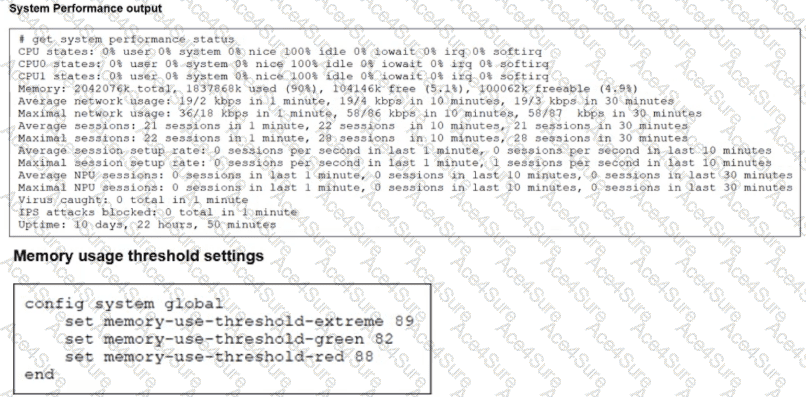
“set memory-use-threshold-extreme < integer > set memory-use-threshold-green < integer > set memory-use-threshold-red < integer > end”
Technical Deep Dive
“What actions does FortiGate take to preserve memory while in conserve mode?
• FortiGate does not accept configuration changes, because they might increase memory usage.”
The system performance output shows Memory: 2042076k total, 1837868k used (90%). The configured thresholds shown are:
green = 82
red = 88
extreme = 89
Because memory usage is 90%, it is:
Above the red threshold (88%) → so FortiGate has entered conserve mode
Above the extreme threshold (89%) → so all new sessions are dropped
That makes A and D correct.
Why the others are wrong:
B is not stated anywhere in the documented FortiOS behavior as an automatic outcome of conserve mode.
C is the opposite of what the guide says. In conserve mode, FortiGate does not accept configuration changes.
A useful verification command is:
diagnose hardware sysinfo conserve
Operationally, once a FortiGate crosses the red threshold, it starts protecting itself by limiting behavior that could increase memory usage. Once it crosses the extreme threshold, it becomes more severe and drops new sessions to keep the system from becoming unstable.
FortiOS 8.0 verification note: The extreme memory threshold triggers drops independently of the red conserve threshold.