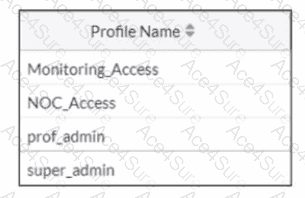
In FortiOS 7.6, GUI session inactivity timeout behavior for administrators is controlled by admin profiles, not by general access permissions or profile ordering.
How GUI idle timeout works in FortiOS 7.6
FortiGate has a global admin timeout (admintimeout), but
Admin profiles can override this value using the Override idle timeout setting.
When Override idle timeout is enabled in an admin profile, the timeout value defined inside that profile takes precedence over the global setting.
The exhibit shows that the NOC team logs in using the NOC_Access admin profile. Therefore, to prevent their GUI sessions from disconnecting too quickly during inactivity, the timeout must be adjusted within that specific admin profile.
Why option B is correct
B. Increase the value of the Override Idle Timeout parameter in the NOC_Access admin profile.
This directly controls how long GUI sessions remain active when users assigned to NOC_Access are idle.
It affects only the NOC team, which matches the requirement precisely.
This is the recommended and documented approach in FortiOS 7.6.
Why the other options are incorrect
A. Increase admintimeout under config system accprofileIncorrect. admintimeout is a global admin setting, not configured under accprofile, and it would affect all administrators, not just NOC users.
C. Move NOC_Access to the top of the listIncorrect. Admin profile order has no impact on session timeout behavior.
D. Assign super_admin roleIncorrect and insecure. Super_admin does not control idle timeout and would unnecessarily grant full privileges.