From the exhibits:
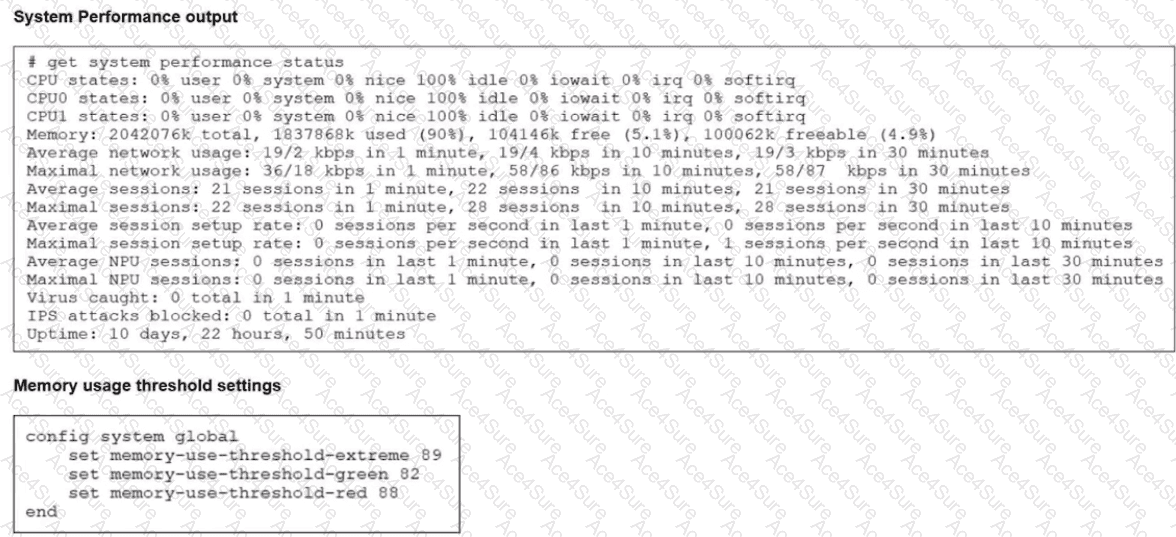
System performance output
Memory used: 90%
Free memory: ~5%
Default memory thresholds (FortiOS 7.6)
memory-use-threshold-green 82%
memory-use-threshold-red 88%
memory-use-threshold-extreme 89%
Because memory usage (90%) exceeds the extreme threshold (89%), the FortiGate enters conserve mode.
Effects of conserve mode (FortiOS 7.6 – verified)
B. FortiGate has entered conserve mode.
Correct
When memory usage exceeds the red/extreme threshold, FortiGate automatically enters conserve mode.
This is exactly the condition shown in the system performance output.
D. Administrators can change the configuration.
Correct
Even in conserve mode:
Administrators can still log in (GUI, SSH, console)
Configuration changes are allowed
FortiGate does not lock configuration access during conserve mode.
This behavior is explicitly documented in the FortiOS 7.6 Conserve Mode section.
Why the other options are incorrect
A. Administrators can access FortiGate only through the console port.
Incorrect
Network access (GUI/SSH) is still available in conserve mode unless otherwise restricted.
Console-only access is not a conserve-mode requirement.
C. FortiGate drops new sessions.
Incorrect (as a general statement)
FortiGate may drop or bypass new inspection-required sessions depending on fail-open/fail-close settings.
It does not universally drop all new sessions, so this statement is not always true.