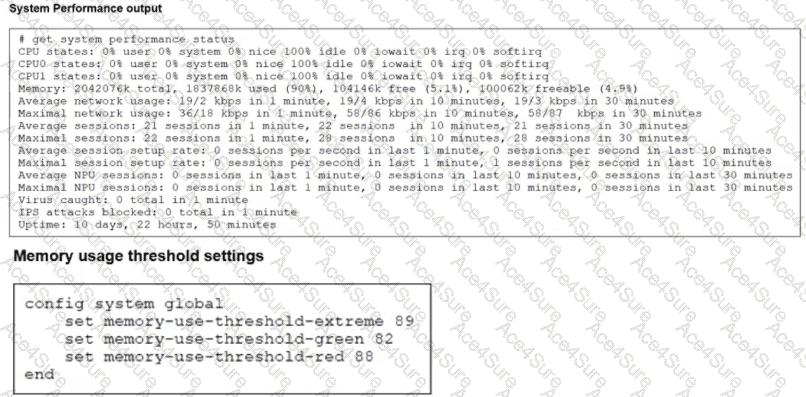
“Three different configurable thresholds define when FortiGate enters and exits conserve mode. If memory usage goes above the percentage of total RAM defined as the red threshold , FortiGate enters conserve mode.”
“If memory usage keeps increasing, it might exceed the extreme threshold . While memory usage is above this highest threshold, all new sessions are dropped. ”
“What actions does FortiGate take to preserve memory while in conserve mode?
• FortiGate does not accept configuration changes , because they might increase memory usage.”
“However, if the memory usage exceeds the extreme threshold, new sessions are always dropped , regardless of the FortiGate configuration.”
Technical Deep Dive:
The system performance output shows Memory: 2042076k total, 1837868k used (90%) . The configured thresholds shown are:
green = 82
red = 88
extreme = 89
Because memory usage is 90% , it is:
Above the red threshold (88%) → so FortiGate has entered conserve mode
Above the extreme threshold (89%) → so all new sessions are dropped
That makes A and D correct.
Why the others are wrong:
B is not stated anywhere in the study guide as an automatic outcome of conserve mode.
C is the opposite of what the guide says. In conserve mode, FortiGate does not accept configuration changes .
A useful verification command is:
diagnose hardware sysinfo conserve
Operationally, once a FortiGate crosses the red threshold , it starts protecting itself by limiting behavior that could increase memory usage. Once it crosses the extreme threshold , it becomes more severe and drops new sessions to keep the system from becoming unstable.