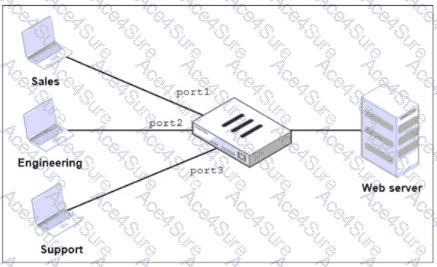
“By default, you can select only a single interface as the incoming interface and a single interface as the outgoing interface. This is because the option to select multiple interfaces, or any interface in a firewall policy, is disabled on the GUI. However, you can enable the Multiple Interface Policies option on the Feature Visibility page to disable the single interface restriction.”
“You can also specify multiple interfaces, or use the any option, if you configure a firewall policy on the CLI, regardless of the default GUI setting.”
Technical Deep Dive:
The correct answer is D .
The policies are identical except for the incoming interface : one is for Sales and one is for Engineering . FortiGate GUI policy creation normally restricts you to one incoming interface per policy. To consolidate both into a single GUI policy, the administrator must enable Multiple Interface Policies so both port1 and port2 can be selected in the same rule.
Why the others are wrong:
A is not enough, because policy matching also includes the incoming interface , not just the source subnets.
B changes the network design and is unnecessary.
C would work too broadly by matching traffic from any interface, which is not the intended controlled consolidation.
A matching CLI-style concept would be:
config firewall policy
edit < id >
set srcintf " port1 " " port2 "
set dstintf " < server-interface > "
set srcaddr " Sales_Subnet " " Engineering_Subnet "
set dstaddr " < web-server > "
set service " HTTP " " HTTPS "
set action accept
next
end
That preserves a single policy while still being specific about which interfaces are allowed.