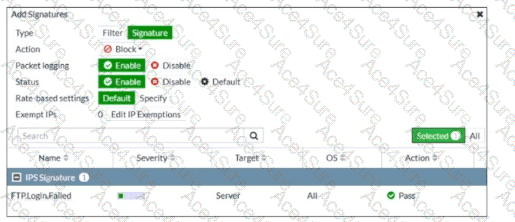
“When you create a new entry to add signatures or filters, you can select the action by clicking Action.”
“When you enable Packet logging , FortiGate stores a local copy of the packet that matches the signature . This enhances the view of erroneous or suspicious packets.”
“You can configure IP exemptions on individual signatures only .”
Technical Deep Dive:
The correct answer is C .
The exhibit shows an IPS entry being added with:
The most certain conclusion from that configuration is that packet logging is enabled , and the study guide explicitly states that this causes FortiGate to store a local copy of the matching packet .
Why the others are wrong:
A is wrong because the exhibit shows Rate-based settings = Default , not a custom threshold.
B is wrong because the configured action is Block , not allow/monitor.
D is wrong because the entry type is Signature , meaning an individual signature is being added, not a signature group.
A useful operational note: packet logging is powerful for IPS investigation and false-positive analysis, but it consumes more storage and processing resources. It should be enabled selectively on signatures where deeper forensic visibility is needed.