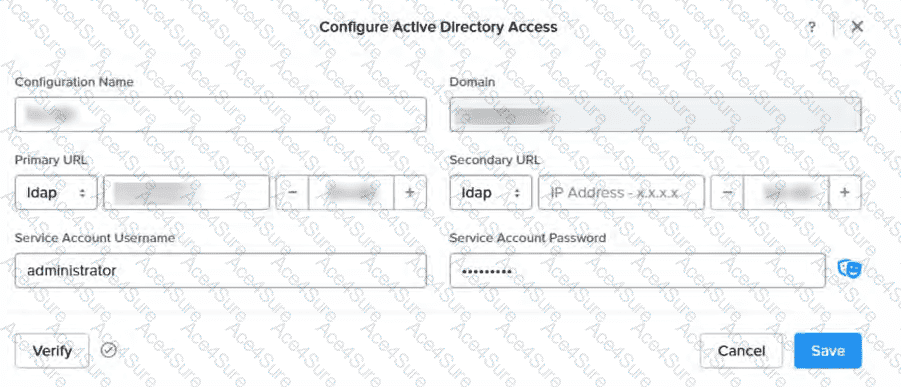
The exhibit shows the configuration of unencrypted Active Directory (AD) access in NDB, with the "Primary URL" set to ldap:// (indicating LDAP rather than LDAPS). Unencrypted LDAP communication uses port 389 by default. For NDB to communicate with Active Directory, this port must be allowed through the firewall to enable the NDB server to perform authentication and directory lookups using the specified service account (e.g., administrator).
Other options are incorrect in this context:
B. 636: This is the default port for LDAPS (LDAP over SSL/TLS), which is encrypted and not applicable since the configuration uses unencrypted LDAP.
C. 2009: This is not a standard port for LDAP or AD communication and is unrelated to NDB’s AD integration.
D. 9440: This is associated with Prism Element’s HTTPS management interface, not AD access.
Thus, the verified answer is A. 389, ensuring unencrypted LDAP communication between NDB and Active Directory.
Official Nutanix Database Automation References
Nutanix Database Management & Automation (NDMA) course, Module 2: Deploying and Configuring an NDB Solution, Lesson 2.5: Configuring Active Directory Integration.
Nutanix Certified Professional - Database Automation (NCP-DB) v7.5Knowledge Objectives, Section 2: Deploy and Configure an NDB Solution, Objective 2.4: Configure AD Access (applicable to v7.5).
Nutanix NDB Administration Guide: "Active Directory Integration" section, detailing LDAP port requirements.