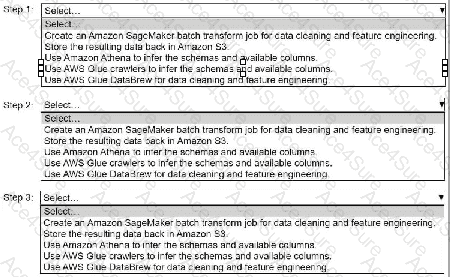
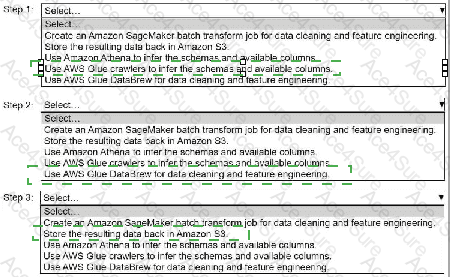
Step 1: Use AWS Glue crawlers to infer the schemas and available columns.
Step 2: Use AWS Glue DataBrew for data cleaning and feature engineering.
Step 3: Store the resulting data back in Amazon S3.
Step 1: Use AWS Glue Crawlers to Infer Schemas and Available Columns
Why? The data is stored in .csv files with unlabeled columns, and Glue Crawlers can scan the raw data in Amazon S3 to automatically infer the schema, including available columns, data types, and any missing or incomplete entries.
How? Configure AWS Glue Crawlers to point to the S3 bucket containing the .csv files, and run the crawler to extract metadata. The crawler creates a schema in the AWS Glue Data Catalog, which can then be used for subsequent transformations.
Step 2: Use AWS Glue DataBrew for Data Cleaning and Feature Engineering
Why? Glue DataBrew is a visual data preparation tool that allows for comprehensive cleaning and transformation of data. It supports imputation of missing values, renaming columns, feature engineering, and more without requiring extensive coding.
How? Use Glue DataBrew to connect to the inferred schema from Step 1 and perform data cleaning and feature engineering tasks like filling in missing rows/columns, renaming unlabeled columns, and creating derived features.
Step 3: Store the Resulting Data Back in Amazon S3
Why? After cleaning and preparing the data, it needs to be saved back to Amazon S3 so that it can be used for training machine learning models.
How? Configure Glue DataBrew to export the cleaned data to a specific S3 bucket location. This ensures the processed data is readily accessible for ML workflows.
Order Summary:
Use AWS Glue crawlers to infer schemas and available columns.
Use AWS Glue DataBrew for data cleaning and feature engineering.
Store the resulting data back in Amazon S3.
This workflow ensures that the data is prepared efficiently for ML model training while leveraging AWS services for automation and scalability.