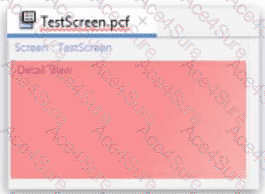
In Guidewire InsuranceSuite PCF (Page Configuration File) Configuration, the hierarchy and structural requirements of container widgets are strictly enforced by the Studio compiler and visual editor. A DetailView (DV) is a specific type of container designed to display and edit individual fields (atomic widgets) in a column-based layout.
When a developer adds a DetailView to a PCF, Studio will initially display it in red, indicating a validation error. This occurs because, according to the PCF Architecture standards, a DetailView is not a direct container for input widgets like TextInput or RangeInput. Instead, it requires a layout-specific child element to define how those widgets are organized. The mandatory child for a standard DetailView is the InputColumn.
An InputColumn provides the necessary structure to align labels and their corresponding input widgets. Without at least one InputColumn defined directly under the DetailView, the DV is considered incomplete and structurally invalid. Adding an InputColumn (Option D) satisfies the minimum container requirement, effectively clearing the validation error and allowing the developer to then place field-level widgets within that column.
Regarding the other options: A RowIterator (Option A) is a component specifically used within a ListView to iterate over a collection of data and is not a direct child of a DetailView. While a ListView (Option C) can be displayed within a DV, it must be wrapped in a ListViewInput or placed inside an InputSet, and simply adding a " list view " does not satisfy the core structural requirement for an input-based DV layout as directly as an InputColumn. A Toolbar (Option B) is typically associated with a Screen, PanelRef, or ListView, rather than being a structural correction for a DetailView. Therefore, the InputColumn is the fundamental architectural element required to make the DV valid.
==========