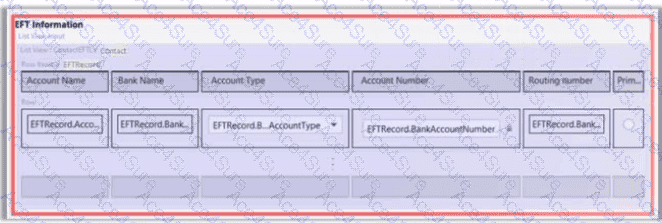
In the Guidewire Page Configuration Framework (PCF), displaying a list of data within a Detail View (DV) requires specific container widgets. When a developer uses a ListViewInput to embed an existing List View into a form, they are essentially creating an " editable grid " section.
1. The Requirement for a Toolbar (Option A)
According to the InsuranceSuite Developer Fundamentals guide, a ListViewInput is a specialized widget that acts as a wrapper for a List View. Unlike a standard List View displayed on its own page (which inherits the page ' s toolbar), a ListViewInput exists inside a Detail View column. For the list to be interactive—allowing users to add new bank accounts or remove existing ones—the ListViewInput must have its own Toolbar. In Guidewire Studio, if a ListViewInput is marked as editable but lacks a toolbar, the metadata validator will flag an error because there is no container to hold the necessary action buttons.
2. Configuring Iterator Buttons (Option B)
Once the Toolbar is added to the ListViewInput, it remains empty until Iterator Buttons are placed inside it. These buttons (typically the " Add " and " Remove " buttons) must be explicitly configured to point to the Row Iterator defined within the referenced List View PCF.
The error in the screenshot is resolved by:
Selecting the ListViewInput in the PCF tree.
Adding a Toolbar child widget.
Adding Iterator Buttons (Add/Remove) to that toolbar.
Linking those buttons to the correct iterator ID.
This combination provides the end-user with the UI controls needed to manipulate the banking information array. Options C and D represent alternative ways to structure the UI but do not address the specific configuration error of the ListViewInput widget. Option E relates to security and runtime behavior, not the structural metadata requirements of the PCF layout engine.