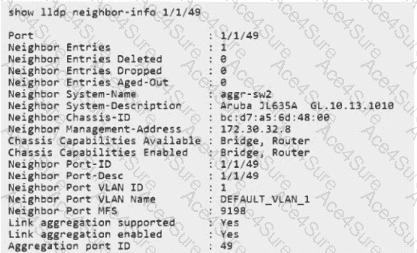
The Link Layer Discovery Protocol (LLDP) is used by Aruba switches to share identity and capability information with neighbors. By default, AOS-CX switches often advertise the IP address of the dedicated Out-of-Band (OOB) management port.
The Management-Address TLV: Neighbors use the " Management Address " Type-Length-Value (TLV) to know which IP they should use to manage the remote device (e.g., for SSH or Web UI access).
Changing the Source: In some designs, you want the switch to be managed through an " In-Band " VLAN interface rather than the physical management port.
AOS-CX Command Syntax: To specify which local interface ' s IP should be placed into the LLDP advertisement, AOS-CX uses the global command:
lldp management-ipv4-address vlan < VLAN-ID >
This tells the LLDP process: " Look at the IP assigned to SVI 5, and use that as our management identity in all LLDP frames sent out of all ports. "
Evaluating the Options:
Option D (Correct): Matches the specific AOS-CX syntax for selecting a VLAN-based management address.
Option B: This syntax is more common in the legacy AOS-S (ProCurve) software, whereas CX uses the management-ipv4-address keyword to distinguish between address families.
Option A: While intuitive, LLDP management address selection is a global process control in AOS-CX, not an interface-level trigger on the SVI itself.
Option C: While you can manually set the address using lldp management-address < IP > , there is no standalone lldp configuration context in the AOS-CX CLI.