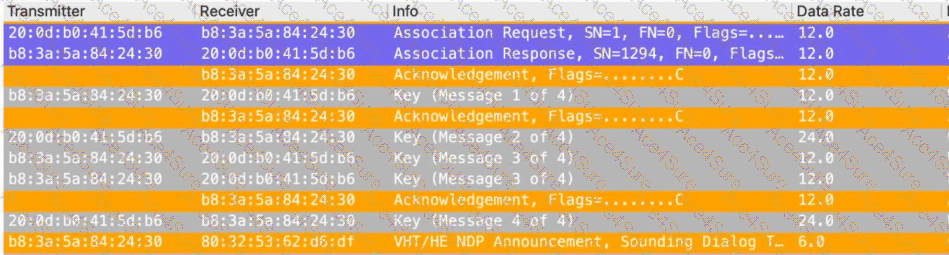
In the provided frame capture, we can clearly observe the following sequence of events:
The client (MAC 20:0d:b0:41:5d:b6) associates with the AP (b8:3a:5a:84:24:30).
The EAPOL 4-way handshake successfully completes (Key Messages 1–4), indicating that the client has successfully joined the secured SSID.
This rules out authentication issues or WPA3 key management errors.
DHCP Exchange:
The client sends a DHCP Request, and the server responds with a DHCP ACK, confirming that the client has successfully obtained an IP address.
Example in the capture:
DHCP Request – Transaction ID 0xd3da62ef
DHCP ACK – Transaction ID 0xd3da62ef
This confirms that DHCP negotiation completed successfully.
ARP Requests and Replies:
After DHCP completion, an ARP broadcast is seen:
Who has 192.168.10.17? Tell 192.168.10.158
This is a normal ARP request from another device trying to reach 192.168.10.17.
This indicates the default gateway responding with its MAC address.
Analysis of the Connectivity Issue:Even though the gateway is sending ARP replies, the repeated ARP responses for 192.168.10.1 in the capture suggest that the client is not caching or acknowledging the ARP entry for the default gateway. This behavior is consistent with a client that does not have a valid or populated ARP entry for its default gateway, leading to traffic failures beyond the local subnet.
This could be due to:
Incorrect ARP response handling on the client.
Firewall or driver issues preventing the ARP reply from being processed.
Power-save or roaming conditions where the ARP table did not update properly.
Exact Extract from HPE Aruba Networking Switching and WLAN Troubleshooting Documentation:
“If a client successfully completes the 4-way handshake and DHCP exchange but fails to pass traffic beyond the local subnet, check for ARP resolution issues.
Missing or invalid ARP entries for the default gateway can prevent Layer 3 connectivity even though the wireless association is successful.”
“Wireshark traces showing repeated ARP replies from the gateway indicate that the gateway is responding, but the client may not be updating its ARP cache, leading to connectivity failures.”
Hence, the conclusion is that the client’s ARP entry for the default gateway is missing or invalid, explaining why connectivity fails despite successful association and DHCP negotiation.
Why the Other Options Are Incorrect:
B. The SSID is using WPA3-Enterprise key management:The handshake shown (EAPOL 4 messages) uses the standard WPA2/AES (EAPOL-Key) exchange. There are no SAE or WPA3 transition frames present.
“WPA3 uses SAE or 802.1X with PMF indicators; the frame capture shows standard WPA2 key exchange.”
C. The client has not obtained an IP address on this network previously:The DHCP Request and ACK exchange confirm that the client has obtained an IP address (192.168.10.158). This option is invalid.
“A completed DHCP ACK indicates the client successfully received an IP address.”
D. The AP is using 20MHz wide 5GHz channels:The frame capture shows VHT/HE announcements, which indicate High Efficiency (HE) capabilities and channel sounding, not 20MHz restrictions. Channel width has no relation to the connectivity failure described.
“VHT/HE frames are part of 802.11ac/ax operation and do not indicate channel width problems.”
References of HPE Aruba Networking Switching Documents or Study Guide:
Aruba WLAN Troubleshooting and Analysis Guide – “ARP, DHCP, and Gateway Reachability Troubleshooting.”
ArubaOS 10 Wireless Fundamentals and Diagnostics Guide – “802.11 Association, 4-Way Handshake, and ARP Behavior.”
Aruba Client Connectivity Troubleshooting Guide (AOS-10 and AOS-8) – “Identifying ARP Cache Issues Post-DHCP Assignment.”
Aruba Network Access and Layer 2 Troubleshooting Guide – “Role of ARP in Wireless Client Connectivity.”