
Microsoft GH-600 Question Answer
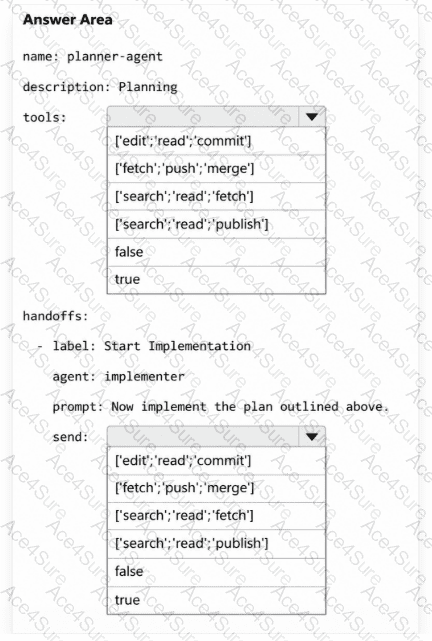
You have a GitHub repository that uses GitHub Copilot Chat in Microsoft Visual Studio Code. Custom agents are stored in the repository under version control.
Your team uses a multi-agent workflow where a planner agent produces an implementation plan that is then handed off to an implementation agent to make changes.
Recent prompts cause the planner agent to start editing files and running commands before the plan is approved.
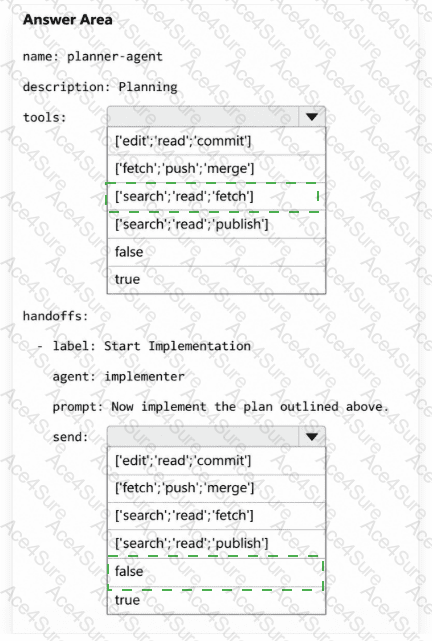
You need to configure the planner agent to meet the following requirements:
Use only read-only tools.
Hand off to the implementation agent only after the plan is approved.
How should you configure the agent? To answer, select the appropriate options in the answer area.
- Printable Format
- Value of Money
- 100% Pass Assurance
- Verified Answers
- Researched by Industry Experts
- Based on Real Exams Scenarios
- 100% Real Questions

