The correct answer is D .
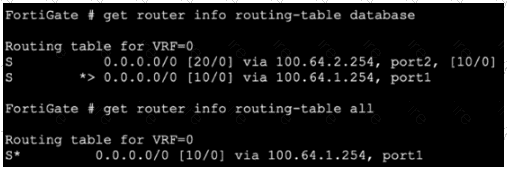
In the exhibit, get router info routing-table database shows both static default routes:
0.0.0.0/0 [20/0] via 100.64.2.254, port2
0.0.0.0/0 [10/0] via 100.64.1.254, port1
But get router info routing-table all shows only:
0.0.0.0/0 [10/0] via 100.64.1.254, port1
The study guide explains that get router info routing-table all displays the routes that make it to the FIB — the best active routes . It also says that this command doesn’t show standby or inactive routes , which can remain only in the routing table database. It gives the exact rule: “when two static routes to the same destination subnet have different distances, the one with the lower distance is installed in the routing table, and the one with the higher distance is installed in the routing table database.”
The study guide also shows the route selection process:
Most specific route
Lowest distance
Lowest metric (dynamic routes)
Lowest priority (static routes)
ECMP
So the port2 default route is absent from the second output because its distance is 20 , while the port1 default route has distance 10 . The lower-distance route is installed in the active routing table/FIB.
Why the other options are wrong:
A is wrong because the exhibit does not indicate port2 is down or disabled.
B and C are wrong because priority is checked only after distance for static routes. Here, the routes already differ by distance , so priority is not the deciding factor.
So the verified answer is: D .