
Microsoft DP-800 Question Answer
You have an Azure SQL database that contains a table named Sales.Orders. Sales.Orders contains the following columns.
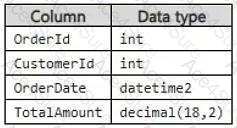
Reporting queries frequently repeat logic to calculate the number of days since an order was placed.
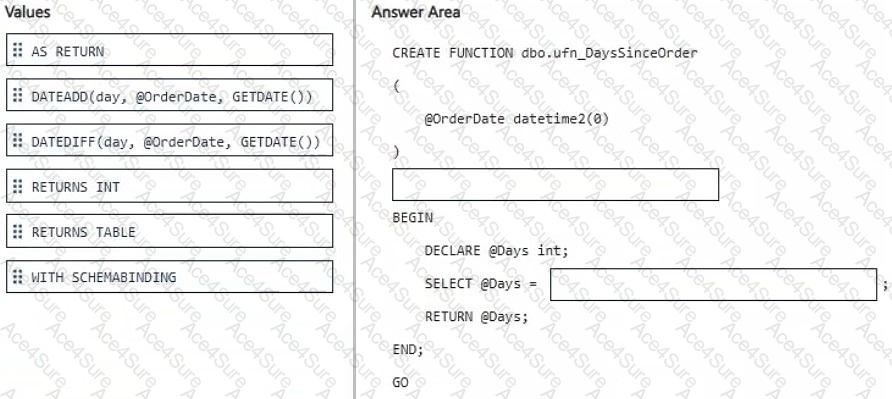
You need to create a scalar user-defined function (UDF) that returns the number of days between an input value of @OrderDate and the current date and time.
How should you complete the Transact-SQL code? To answer, drag the appropriate values to the correct targets. Each value may be used once, more than once, or not at all. You may need to drag the split bar between panes or scroll to view content.
NOTE: Each correct selection is worth one point.

DP-800 PDF/Engine
- Printable Format
- Value of Money
- 100% Pass Assurance
- Verified Answers
- Researched by Industry Experts
- Based on Real Exams Scenarios
- 100% Real Questions

Get 70% Discount on All Products,
Use Coupon: "coponace"
