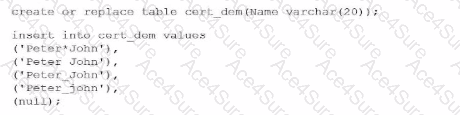
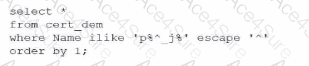
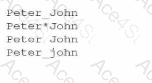
To determine the correct output, a Data Analyst must understand the behavior of the ILIKE operator, wildcard characters, and the ESCAPE clause in Snowflake.
1. Pattern Matching with ILIKE: The ILIKE operator performs case-insensitive pattern matching. The provided pattern is 'p%^_j%'.
p: The string must start with the letter 'P' or 'p'.
%: This wildcard matches any sequence of zero or more characters.
^_: The ESCAPE '^' clause identifies the caret symbol as an escape character. This means the underscore (_) immediately following it is treated as a literal character rather than its usual wildcard function (which matches any single character).
j: The letter 'J' or 'j' must follow the literal underscore.
%: Matches any trailing sequence of characters.
2. Evaluating the Data: Applying this logic to the values in the cert_dem table:
'Peter*John': While it starts with 'P' and contains 'J', it lacks the required literal underscore. No match.
'Peter John': Contains a space instead of an underscore. No match.
'Peter_John': Starts with 'P', contains a literal underscore, and is followed by 'J'. Match.
'Peter_john': Because the operator is ILIKE (case-insensitive), the lowercase 'j' is accepted. Match.
null: Comparisons with NULL using LIKE or ILIKE always return NULL (unknown), so it is excluded from the results.
3. Ordering the Results: The query includes ORDER BY 1, which sorts the results alphabetically based on the first column. Between 'Peter_John' and 'Peter_john', the standard sort order typically places uppercase before lowercase in most Snowflake collations.
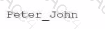
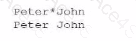
Evaluating the Options (image_829269.png):
Option A incorrectly excludes the case-insensitive match.
Option B incorrectly identifies values that lack the literal underscore.
Option D incorrectly includes values that do not meet the escaped underscore requirement.
Option C is the 100% correct result set, displaying both versions of 'Peter_John' that contain the literal underscore.