To automate a data pipeline in Snowflake using Tasks and Streams, an analyst must understand the relationship between scheduling and conditional execution. A task is an object used to execute a single SQL statement (or a call to a stored procedure) on a recurring basis. A stream, on the other hand, tracks Change Data Capture (CDC) metadata for a table, indicating whether new rows have been added, updated, or deleted.
The core requirement of this question is to ensure the task runs automatically but only if there is new data. In Snowflake, a task requires a SCHEDULE parameter to run automatically without manual intervention. The SCHEDULE defines the frequency (e.g., '5 MINUTE' or a CRON expression) at which the task "attempts" to run. However, to prevent wasting credits by running the task when no data has changed, the WHEN clause is used in conjunction with the system function SYSTEM$STREAM_HAS_DATA('stream_name').
Evaluating the Options based on the exhibit (image_8c9a13.png):
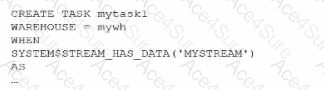
Option A is incorrect because it lacks a SCHEDULE. Without a schedule, the task is considered "standalone" and will never execute unless manually triggered by an EXECUTE TASK command.
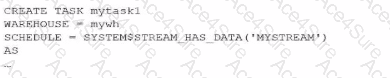
Option B is incorrect because it incorrectly attempts to place the SYSTEM$STREAM_HAS_DATA function within the SCHEDULE parameter. The schedule must be a time-based interval or a cron string.
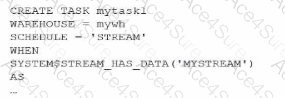
Option C is incorrect because 'STREAM' is not a valid schedule interval.
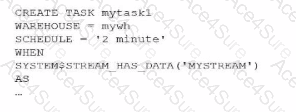
Option D is the 100% correct answer. It provides a valid time-based SCHEDULE ('2 minute') which enables the task to heart-beat automatically. It then correctly utilizes the WHEN clause with SYSTEM$STREAM_HAS_DATA('MYSTREAM'). This configuration ensures that every two minutes, Snowflake checks the stream; if the stream contains data, the task executes the SQL; if the stream is empty, the task skips the execution, saving compute resources. This pattern is the industry standard for building efficient, automated Data Transformation pipelines in the Snowflake Data Cloud.