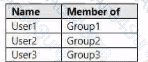
User1 can read the files in Share1. Yes
User3 can delete files in Share1. No
If User2 connects to \Server1.adatum.com from File Explorer, (Share1 will be visible). Yes
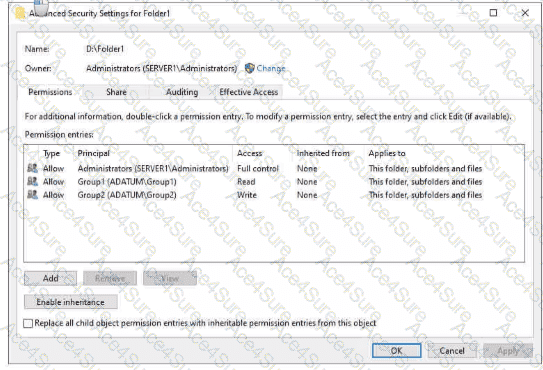
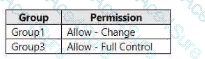
In Windows file sharing, effective access over SMB = the most restrictive result of Share permissions AND NTFS permissions. The AZ-800 materials emphasize that a user must have sufficient permission on both layers to perform an action. In Folder1, NTFS ACLs grant Group1 = Read, Group2 = Write, and no entry for Group3. The share “Share1” grants Group1 = Change and Group3 = Full Control.
User1 (Group1): Share permission “Change” would allow modify over SMB, but NTFS grants only Read. Because the effective permission is the lower of the two, User1 is effectively Read and therefore can read the files.
User3 (Group3): Although the share grants Full Control, there is no NTFS entry for Group3 (inheritance is disabled), so NTFS denies access. Without NTFS rights (e.g., Modify/Delete), delete is not possible.
User2 (Group2): NTFS grants Write, but there is no share permission for Group2, so User2 cannot access content through the share. However, the share’s FolderEnumerationMode = Unrestricted (i.e., Access-Based Enumeration is off). As covered in the hybrid core guide, when ABE is disabled, users can see items even if they lack permissions. Thus, when User2 browses \Server1.adatum.com, Share1 is visible (opening it will result in Access Denied).
Therefore: Yes (User1 read), No (User3 delete), Yes (User2 sees Share1).