
Pre-Winter Sale Special Limited Time 65% Discount Offer - Ends in 0d 00h 00m 00s - Coupon code: ac4s65

You have the following primary data source that contains a dimension named Dorm_Code.
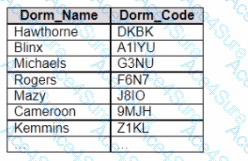
You have the following primary data source that contains a dimension named Dorm_Code.

You receive the following secondary data source that contains updated dorm codes.
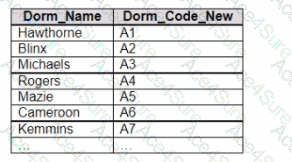
You need to bring the updated dorm codes into Tableau and use the codes in existing visualizations. The new dorm codes must use the existing field name of Dorm_Code.

What should you do?

A.

Bring in the secondary data source as a union.

B.

Bring in the secondary table as a left join to the primary data source. From the Data Source page, select Create Calculated Field in the Dorm_Name field and enter [Dcrm_Name_New] in the calculation window

C.

Bring in the secondary data source by using relationships. From the Data pane, right-click Dorm_Name select Replace References, and then select Dorm_Name_New

D.

Create a data blend and select Edit Primary Aliases to replace the primary data source alias values with values from the secondary data source

Analytics-DA-201 PDF/Engine
  • Printable Format
  • Value of Money
  • 100% Pass Assurance
  • Verified Answers
  • Researched by Industry Experts
  • Based on Real Exams Scenarios
  • 100% Real Questions
buy now Analytics-DA-201 pdf
Get 65% Discount on All Products, Use Coupon: "ac4s65"

