Tableau’s built-in geocoding supports only the following geographic roles:
Country
State / Province
County
City
Postal Code
Airport
Area codes
Congressional districts, etc.
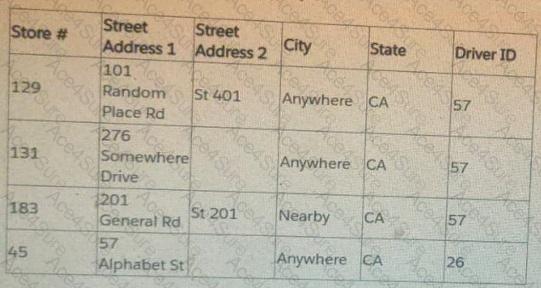
Tableau does NOT natively geocode street-level addresses.
When a dataset contains street address fields, Tableau will not recognize them as geographic fields because:
Street Address 1 and Street Address 2 are not valid Tableau geographic roles.
Tableau cannot automatically translate street text (like “101 Random Place Rd”) into latitude/longitude.
Therefore, to plot street-level points on a map, Tableau requires:
Custom geocoding OR latitude/longitude fields.
Tableau documents that for exact address locations:
You must either supply latitude and longitude for each address, or
Use custom geocoding, where the user uploads a .csv with addresses matched to coordinates.
Why the other answer choices are incorrect:
B. Change the data type to Geographic role
Street address fields cannot be assigned a geographic role. Tableau will reject them or not map them.
C. Establish a hierarchy
Hierarchies help with drilldown but do not generate geographic coordinates for street addresses.
D. Add a map layer
Map layers allow visual overlays but cannot generate geocoding for address fields.
The only correct way to map street addresses is to custom geocode (or supply lat/long), which matches option A.
Tableau Geocoding documentation stating street-level addresses are not natively supported.
Custom Geocoding instructions for mapping exact address points.
Mapping best practices stating that lat/long or custom geocode files are required for street accuracy.