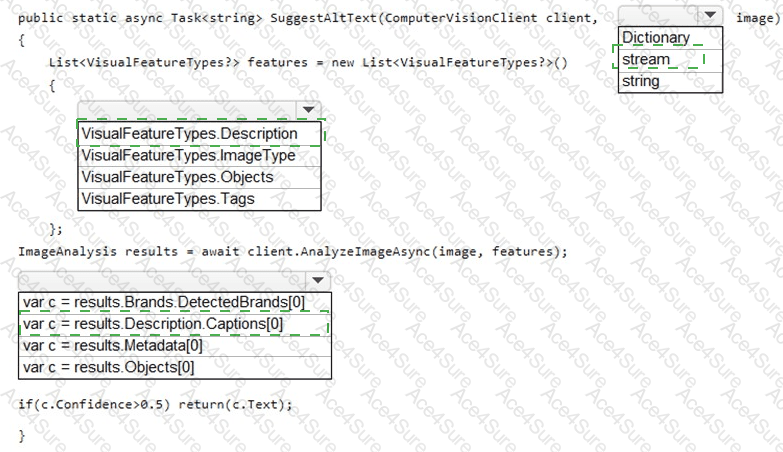
Parameter type: stream
Visual features list: VisualFeatureTypes.Description
Result to use: results.Description.Captions[0]
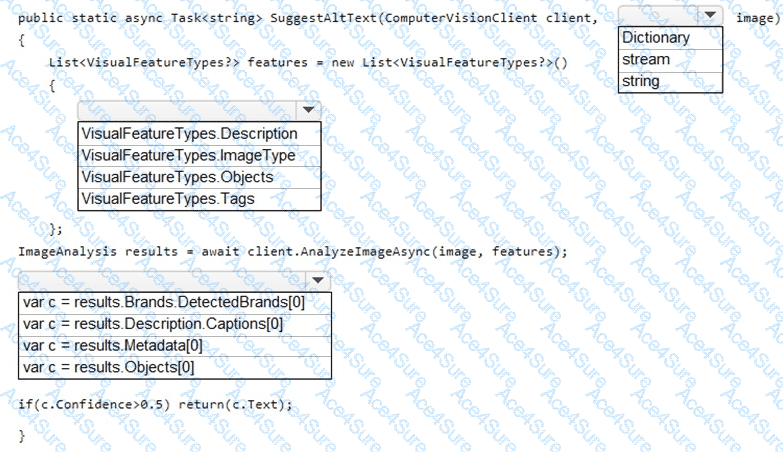
To generate accessible alt text , you should use the caption produced by Azure Computer Vision’s Description feature (it produces a human-readable sentence with a confidence score). Therefore:
The image input should be a stream , because you’re uploading images (not just passing URLs) during product creation and AnalyzeImage…Async supports image streams .
Request the Description feature in VisualFeatureTypes so the service returns results.Description.Captions.
Use results.Description.Captions[0] and return the caption text if its confidence is high enough (e.g., > 0.5) to meet the accessibility requirement that all images must have relevant alt text .
Other features (Tags, Objects, Brands) are useful for enrichment but do not directly return natural-language captions suitable for alt text.
Microsoft Azure AI Solution References
Computer Vision (Image Analysis) – Description/Captions and features: Microsoft Docs, Image Analysis – VisualFeatureTypes.Description returns description.captions.
https://learn.microsoft.com/azure/ai-services/computer-vision/concept-image-analysis
SDK usage (analyze image from a stream): Microsoft Docs, Analyze an image by using the Computer Vision client library .
https://learn.microsoft.com/azure/ai-services/computer-vision/how-to/call-analyze-image?tabs=version-3-2#analyze-an-image-from-a-stream