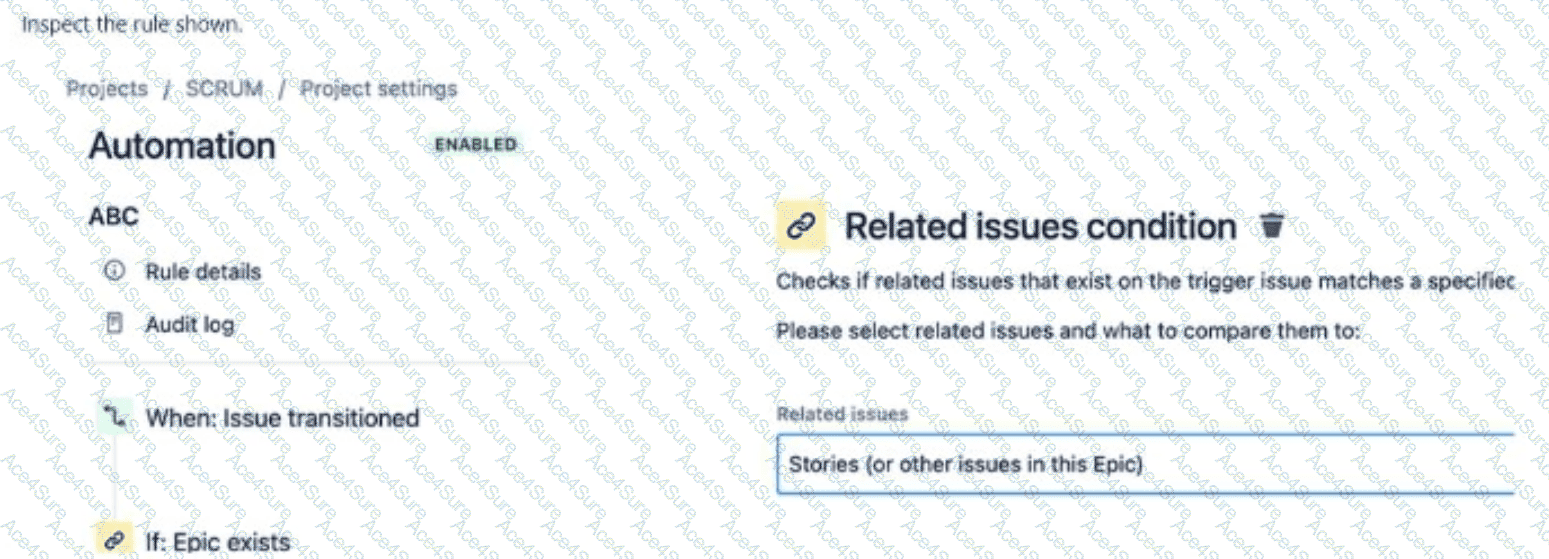
The automation rule in the SCRUM project triggers when an issue is transitioned, checks if an Epic exists, and includes a Related issues condition that evaluates whether Stories (or other issues in this Epic) exist. The question asks what is being transitioned in the last component of the rule. Based on the rule structure, the last component is the Related issues condition, which does not perform a transition—it only checks a condition. However, interpreting the question in the context of the entire rule, the trigger issue (Option D) is the issue being transitioned in the initial When: Issue transitioned component, and subsequent components (like conditions) do not introduce new transitions unless explicitly stated (e.g., via an action).
Explanation of the Correct Answer (Option D):
The rule structure is:
When: Issue transitioned: This is the trigger, meaning the rule runs when an issue (the trigger issue) is transitioned to a new status in the workflow.
If: Epic exists: This condition checks if the trigger issue is associated with an Epic (e.g., it’s an Epic itself or a Story linked to an Epic).
Related issues condition: Stories (or other issues in this Epic): This condition checks if there are Stories (or other issues) related to the Epic associated with the trigger issue.
The last component shown is the Related issues condition, which does not perform a transition—it only evaluates whether Stories exist in the Epic. However, the question likely intends to ask about the issue being transitioned in the overall rule context. The When: Issue transitioned trigger indicates that the trigger issue is the one undergoing the transition that initiates the rule.
Since the rule does not yet include an action (e.g., transitioning related issues), the only issue being transitioned in the rule’s execution is the trigger issue—the issue that was transitioned to activate the rule.
Exact Extract from Documentation:
Jira automation components
Automation rules act on the trigger issue by default, which is the issue that activates the rule (e.g., the issue transitioned for an Issue Transitioned trigger).
Conditions like Related issues condition check for related issues (e.g., Stories in an Epic) but do not transition issues unless an action is specified.
Actions like Transition issue apply to the trigger issue or related issues if specified (e.g., via a branch).Note: Without a branch or action, the rule does not transition additional issues beyond the trigger.(Source: Atlassian Support Documentation, "Automate your Jira Cloud instance")
Why This Fits: The trigger issue is the issue being transitioned in the When: Issue transitioned component, and the Related issues condition does not introduce a new transition. Thus, the trigger issue (Option D) is the issue being transitioned in the rule’s context.
Why Other Options Are Incorrect:
A single story (Option A):
The Related issues condition checks for Stories in the Epic but does nottransition them—it only evaluates their existence. The rule does not yet include an action to transition a single Story, and the trigger issue (being transitioned) is not specified as a Story (it could be an Epic or another issue type).
Extract from Documentation:
The Related issues condition evaluates related issues but does not transition them unless an action (e.g., Transition issue) is specified.
(Source: Atlassian Support Documentation, "Jira automation conditions")
Transitioning multiple issues requires a branch (e.g., For Stories) and a Transition issue action, which is not present in the rule.
(Source: Atlassian Support Documentation, "Jira automation actions")
An epic (Option C):
The If: Epic exists condition checks for an Epic, but the trigger issue (being transitioned) could be any issue type (e.g., an Epic, Story, or Task). The rule does not specify that the trigger issue is an Epic, so this is not definite.
Extract from Documentation:
The Issue Transitioned trigger applies to any issue type, not specifically Epics, unless filtered by a condition (e.g., Issue Type = Epic).
(Source: Atlassian Support Documentation, "Jira automation triggers")
To transition Sub-tasks, use a branch like For Sub-tasks with a Transition issue action, which is not present in the rule.
(Source: Atlassian Support Documentation, "Jira automation actions")
Additional Notes:
The rule is incomplete as shown, lacking an action (e.g., transitioning Stories or the Epic). The question likely assumes the focus is on the trigger issue being transitioned in the When component.
If the rule were to include an action (e.g., Transition Stories to Done), the answer might involve Stories, but the current rule stops at the condition.
The rule is configured in Project settings > Automation and requires project admin privileges for project-level rules.
[References:, Atlassian Support Documentation:Automate your Jira Cloud instance, Atlassian Support Documentation:Jira automation triggers, Atlassian Support Documentation:Jira automation conditions, Atlassian Support Documentation:Jira automation actions, , ]