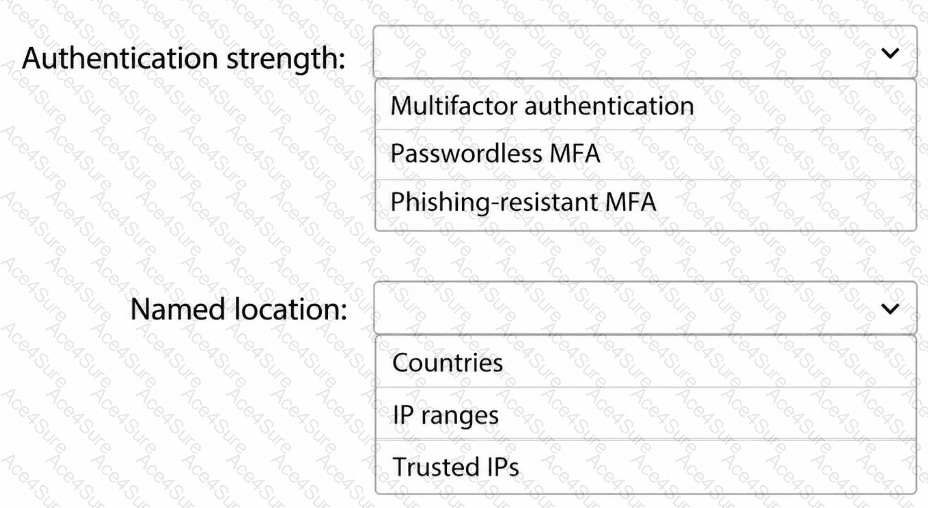
Answer Area
Correct Selection
Authentication strength
Phishing-resistant MFA
Named location
IP ranges
HOTSPOT Exhibit — White Background with Original Dropdown Options
Microsoft Entra Conditional Access supports authentication strengths and named locations to enforce secure authentication while excluding trusted corporate networks.
First selection: Phishing-resistant MFA.
The built-in Phishing-resistant MFA authentication strength supports the following authentication methods:
FIDO2 passkeys and security keys
Windows Hello for Business
Microsoft Entra certificate-based authentication configured for multifactor authentication
This matches the stated requirements. Standard Multifactor authentication and Passwordless MFA permit additional authentication methods that are not necessarily phishing-resistant, so neither provides the required restriction.
Second selection: IP ranges.
Microsoft Entra named locations allow administrators to define trusted corporate locations using public IPv4 or IPv6 address ranges.
Administrators should navigate to Microsoft Entra admin center → Entra ID → Conditional Access → Named locations.
Create an IP ranges named location, enter the London office ' s public IP ranges, and enable Mark as trusted location.
Next, edit Policy1, configure its Network condition, and exclude the London named location.
Countries is inappropriate because the requirement concerns one office rather than the entire United Kingdom. Trusted IPs refers to a legacy multifactor authentication configuration rather than the recommended IP-based named-location method.
Therefore, Phishing-resistant MFA and IP ranges satisfy both requirements.
Microsoft References:
Microsoft Learn — Conditional Access authentication strengths
Microsoft Learn — Named locations and trusted networks