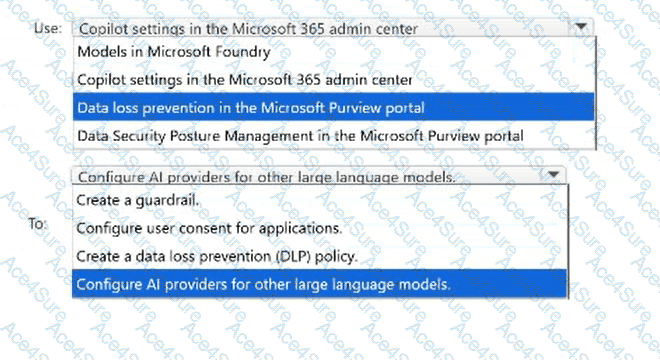
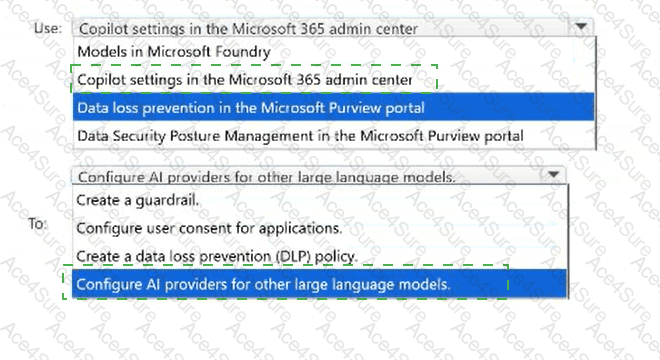
Use: Copilot settings in the Microsoft 365 admin center; To: Configure AI providers for other large language models
Microsoft 365 Copilot provides administrative settings for controlling access to supported AI model providers. These controls enable organizations to restrict external large language model providers without disabling Microsoft ' s standard Copilot capabilities.
First selection: Copilot settings in the Microsoft 365 admin center.
The Microsoft 365 admin center centralizes configuration of Microsoft 365 Copilot services, including agent management, user access, data access, and external AI provider settings.
Administrators with appropriate permissions can open the Microsoft 365 admin center and navigate to Copilot, Settings, and Data access.
Second selection: Configure AI providers for other large language models.
This setting controls access to supported external AI model providers that integrate with Copilot experiences.
Administrators can review the available external providers and block them or restrict their availability to specific users and groups, depending on the provider ' s supported controls.
Disabling access to external model providers prevents users from selecting those providers through supported Copilot integrations while leaving Microsoft ' s standard Copilot services available.
Creating a DLP policy is not the appropriate mechanism because DLP primarily governs sensitive information handling rather than directly controlling external model-provider availability.
Similarly, application consent settings and agent guardrails address different governance requirements.
Therefore, the Microsoft 365 admin center ' s AI provider configuration is the correct solution.
Microsoft References:
https://learn.microsoft.com/en-us/copilot/microsoft-365/microsoft-365-copilot-page
https://learn.microsoft.com/en-us/microsoft-365/copilot/connect-mistral-ai-models