Cisco 800-150 Question Answer
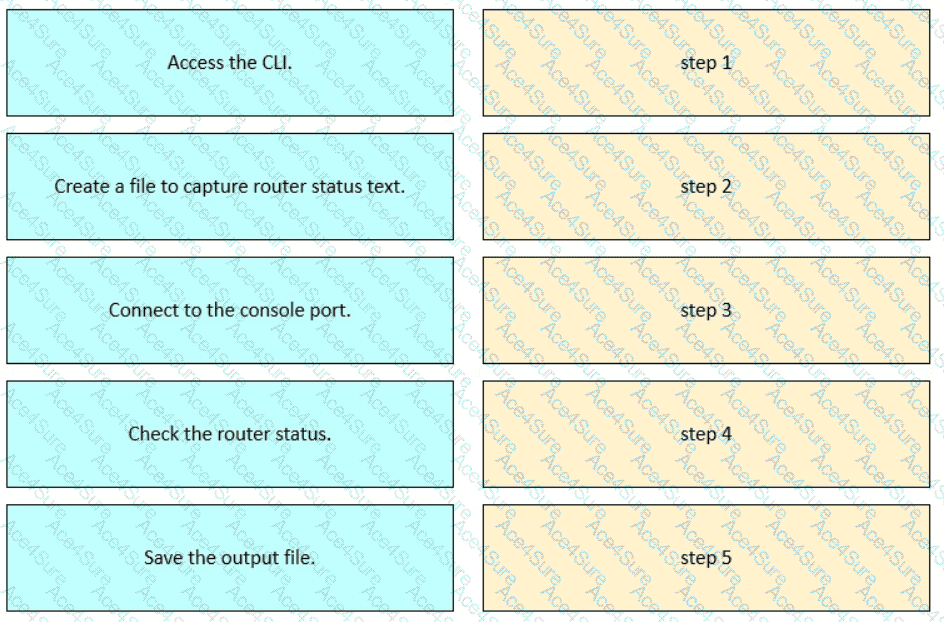
Drag and drop the steps from the left into order to capture the status of a Cisco device.
This procedure is taught in theFLDTEC courseunder theDevice Configuration and Verificationsection and reflects standard field technician workflows:
Connect to the console portusing a console cable and terminal software (like PuTTY or Tera Term).
Access the CLIof the Cisco device by logging in via the console session.
Create a log fileor enable logging in the terminal emulator to begin capturing output.
Check the router statususing commands such as show running-config, show ip interface brief, or show version.
Save the output filefrom the terminal emulator for documentation, troubleshooting, or escalation.
This logical flow ensures accurate diagnostics and traceability during field support operations.
TESTED 22 Feb 2026
Copyright © 2014-2026 ACE4Sure. All Rights Reserved