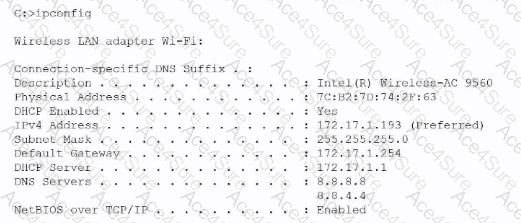
The key detail in the ipconfig output is that the system is receiving an IP address, subnet mask, default gateway, and DHCP server information via DHCP, but the DNS servers shown are 8.8.8.8 and 8.8.4.4, which are Google’s public DNS servers. In most corporate networks, DNS is provided internally by the DHCP server—usually the same device assigning the IP address. When DNS values are different from DHCP-provided defaults, it indicates manual DNS configuration.
CompTIA A+ emphasizes that mismatched DNS settings can cause browsing issues, name-resolution delays, or an inability to access internal resources. DNS is critical because it translates domain names into IP addresses; if manually configured, the device bypasses the organization’s DNS server and may not resolve internal hostnames.
The subnet mask is correct for a Class B private network subdivided using /24 (255.255.255.0). NetBIOS being enabled is common and not a cause of connectivity issues here. DHCP being enabled is normal and functioning correctly, as shown by the proper IP lease obtained.
Thus, the anomalous and most likely problematic configuration is manually configured DNS, making Option D correct.