Correctly identifying physical connectors is an essential skill for IT support technicians who install, maintain, and troubleshoot computer hardware.
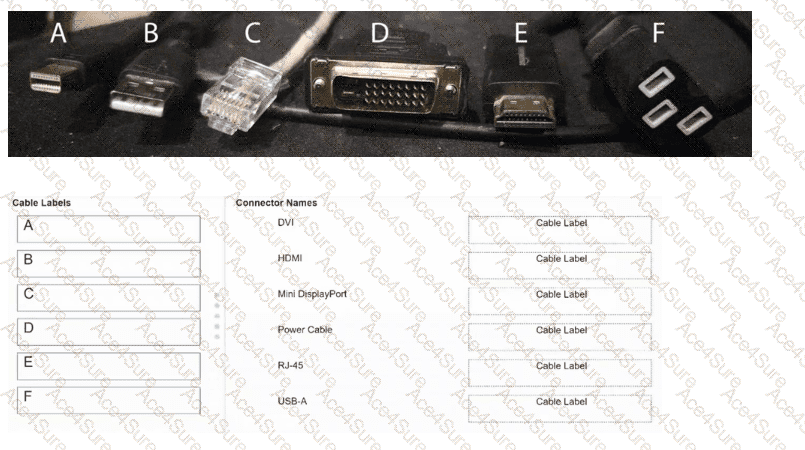
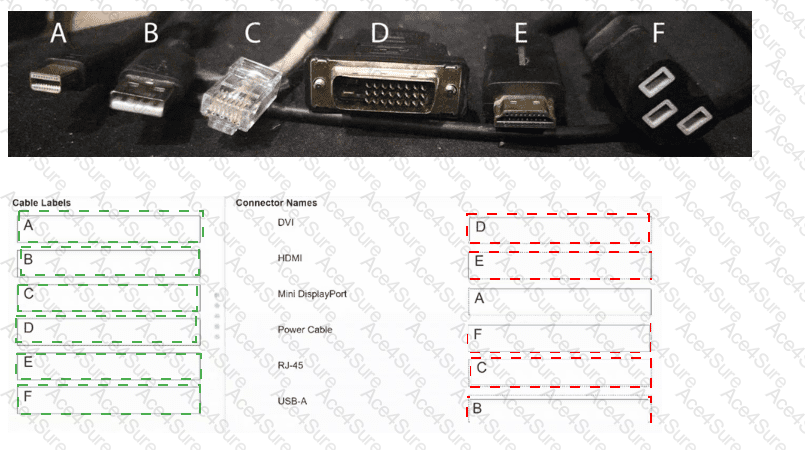
A — Mini DisplayPort: A compact digital display connector used to transmit video and, on supported devices, audio signals. Its small rectangular profile distinguishes it from standard DisplayPort and HDMI connectors.
B — USB-A: A rectangular USB connector commonly used for keyboards, mice, flash drives, and peripheral devices. USB-A provides data connectivity and electrical power to compatible devices.
C — RJ-45: An eight-position modular connector typically used with Ethernet cables. It connects computers, switches, routers, and other network devices over twisted-pair cabling.
D — DVI: Digital Visual Interface is primarily used for video transmission between computers and monitors. Its characteristic rectangular connector includes multiple pins and retaining screws.
E — HDMI: High-Definition Multimedia Interface carries digital video and audio through a single cable. Its distinctive trapezoidal connector is widely used with monitors, televisions, and multimedia equipment.
F — Power Cable: The pictured three-opening connector is an IEC-style female power connector commonly used to supply AC electricity to desktop computers, monitors, and other equipment.
Understanding connector shapes, functions, and compatibility enables technicians to select appropriate cables and efficiently diagnose physical connectivity problems.
[References:, Cisco Certified Support Technician (CCST) IT Support 100-140 Official Cert Guide, Chapter 2: Hardware — Ports and Interfaces, pages 39–50. , Cisco Press, Cisco CCST IT Support Exam Topics, Domain 2.3: Assist End Users in Locating, Identifying, and Understanding the Characteristics of Various Ports and Cables. , Cisco Learning Network, Cisco CCST IT Support Pearson Cert Prep, Lesson 6: Physical Port and Cable Types, , ]