Comprehensive and Detailed Explanation From Cisco Certified Support Technician (CCST) Official Cert Guide
Windows Device Manager is a diagnostic utility used to examine hardware devices, identify driver problems, and troubleshoot device configuration issues.
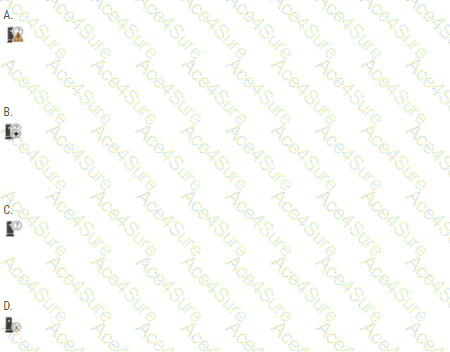
Option A — Correct: A yellow warning triangle containing an exclamation mark (!) indicates that Windows has detected a problem associated with a hardware device. Possible causes include missing or incompatible drivers, incorrect configurations, hardware resource conflicts, or device initialization failures.
The Cisco CCST IT Support Official Cert Guide explains that this indicator can appear when a device driver is missing or Windows is using a generic driver.
Why the remaining options are incorrect:
B — Downward Arrow: Typically indicates that the device has been disabled in Device Manager rather than identifying a malfunction.
C — Information Symbol: In older Device Manager interfaces, this symbol can indicate manually configured device resources. It does not independently establish that a device is malfunctioning.
D — Red X: Traditionally indicates a disabled device in older Windows versions. It is not the standard warning indicator for a malfunctioning device.
Recommended troubleshooting procedure: Open Device Manager, locate the device displaying the yellow warning triangle, right-click it, and select Properties. Examine the Device status field for an error code and description. Correct the underlying driver, configuration, or hardware problem as indicated by the diagnostic information.
[References:, Cisco Certified Support Technician (CCST) IT Support 100-140 Official Cert Guide, Chapter 2: Hardware, page 64, Figure 2-23: Windows Device Manager. , ciscopress.com, Microsoft Learn, Using Device Manager — Device Status and Troubleshooting. , GitHub, Microsoft Learn, Device Manager Error Messages — Device Problem Codes., , , ]